
The AI platform engineer on Google Cloud: what the job is, and the platform you build
What an AI platform engineer actually owns on Google Cloud in 2026: the front door, managed and self-hosted serving, pipelines and evals, data, guardrails, agent governance and cost. With a reference architecture you can download as draw.io.

Most companies didn't plan to have an AI platform. It turned up on its own. One team called Gemini from a notebook, another put an open model on a GPU node pool, a third wired an agent to the ticketing system with a personal API key. Six months later there are four ways to call a model, nobody knows what last month's GPU bill paid for, and security finds out about the agent from an audit log.
The AI platform engineer is the person who turns that into a paved road. It's not a research job and it's not a data science job. It's platform engineering where the tenants are models, pipelines and agents instead of web services. The skills you already have in Kubernetes, IAM, networking, Terraform and cost control are most of it. What's new is the set of things that can go wrong.
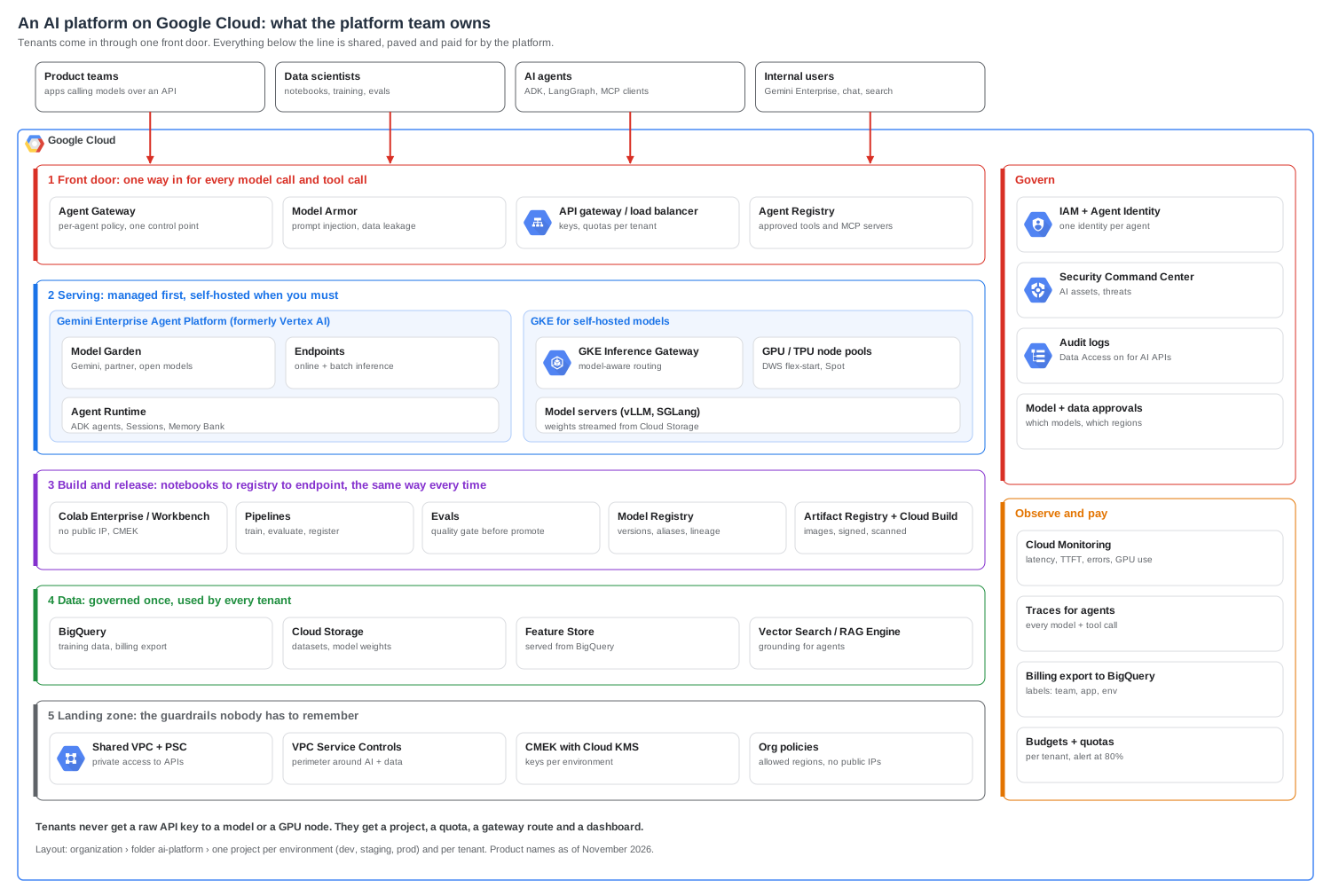
This article covers what the job is on Google Cloud today, the platform you end up building layer by layer, and the problems that show up in the first year. There's a reference architecture at the top and an editable draw.io file at the end.
The short version
- The job is platform engineering for AI workloads. You own the road models and agents travel on: access, serving, release, guardrails, observability and cost. You don't own the models themselves.
- Build one front door. Every model call and every agent tool call goes through a gateway you control. Without it you can't do quotas, safety filtering, cost attribution or incident response.
- Managed serving first, GKE when you have a reason. Gemini and partner models through Gemini Enterprise Agent Platform cover most teams. Self-host on GKE when you need an open model, a fine-tune you can't host elsewhere, or a price at scale that managed can't match.
- Put an eval gate in the release path. A model or prompt change goes through the same pipeline as code: build, evaluate against a fixed set, register, promote. No eval, no promote.
- Give every agent its own identity. One service identity per agent, a list of tools it may call, and human approval for anything that writes.
- Draw the perimeter before the first tenant. VPC Service Controls around AI and data projects, CMEK, private access only, allowed regions in org policy.
- Make cost a feature of the platform. Labels on everything, billing export to BigQuery, a budget per tenant, and GPUs that scale to zero or sit in a shared pool.
A note on names
At Google Cloud Next in April 2026, Vertex AI became Gemini Enterprise Agent Platform, and most of its products were renamed with it. Vertex AI Pipelines is now Gemini Enterprise Agent Platform Pipelines, Vertex AI Agent Engine is now Agent Runtime, Vertex AI Model Registry is now Model Registry on Gemini Enterprise Agent Platform, and so on. Google keeps a name changes page with the full mapping.
Two practical points. First, a lot of the tooling still carries the old name. The Python SDK still lives under google.cloud.aiplatform, and you'll keep seeing aiplatform in API names, IAM roles and Terraform resources, so check the current docs before you rename anything in your code. Second, people will say "Vertex" for years. In this article I use the new names and mention the old one where it helps.
What the job is, and what it isn't
The quickest way to describe the role is by what it sits next to.
| Role | Owns | Asks |
|---|---|---|
| ML engineer / data scientist | The model, its training data, its quality | "Is this model good enough?" |
| AI application engineer | The product feature, prompts, agent logic | "Does this feature work for users?" |
| Data engineer | Pipelines, warehouses, data quality | "Is the data right and on time?" |
| SRE | Reliability of production services | "Is it up, and how fast?" |
| AI platform engineer | The shared road all of the above use | "Can every team ship AI safely, cheaply and the same way?" |
In practice the week looks like this: building a project factory so a new team gets an AI project with the perimeter, quotas and dashboards already in place; tuning a GKE node pool so a 70B model starts in two minutes instead of twelve; writing the policy that stops an agent from calling the payments API without an approval; explaining to finance why the Gemini bill doubled (it was one batch job with no context caching); and sitting in the incident review when an agent did something odd.
What it isn't: picking the model for a product, writing prompts for a feature, or labelling data. You make those things easy and safe for the teams that do them.
The platform, layer by layer
1. The front door
If you build only one thing, build this. Every request to a model and every tool call from an agent goes through a gateway that the platform owns. It's the only place you can do all of these at once:
- Authenticate the caller and map it to a tenant, a project and a cost centre.
- Enforce quotas per tenant, so one team's batch job doesn't eat the shared Gemini quota and cause 429s for everyone else.
- Filter content. Model Armor screens prompts and responses for prompt injection, jailbreaks and sensitive data leaking out.
- Control tools. For agents, Agent Gateway is the single control point, and Agent Registry holds the list of approved tools and MCP servers. An agent can only reach what's in the registry.
- Log every call with tenant, model, token counts and latency, which is what you'll need for both cost and incident response.
The common mistake is letting teams call the model APIs directly "just for the prototype". Prototypes go to production. Hand out a gateway route from day one, even if the first version is a thin proxy on Cloud Run that adds a header and logs the call.
2. Serving: managed first, self-hosted when you must
You'll run two kinds of serving, and the platform's job is to make them look the same from the outside.
Managed, on Gemini Enterprise Agent Platform. Model Garden gives you Gemini, partner models and many open models. Endpoints handle online and batch inference for your own models, and Agent Runtime hosts agents built with the Agent Development Kit (ADK), with Sessions and Memory Bank for state. For most teams this is the right answer: no GPUs to manage, no capacity planning, and a bill per token or per node hour.
Self-hosted, on GKE. You'll need this when a team wants an open model you'd rather run yourself, a fine-tune with strict data rules, or a price per token at high volume that beats the managed rate. The pieces that matter:
- GKE Inference Gateway routes requests by model and by load on each replica (queue depth, KV cache use), not round robin. That alone usually cuts tail latency more than adding replicas.
- GPU and TPU node pools with Dynamic Workload Scheduler flex-start for jobs that can wait for capacity, Spot for batch and evals, and a small reserved pool for the latency-sensitive model.
- Model servers such as vLLM or SGLang, with weights streamed from Cloud Storage instead of baked into the image. A 40 GB image is how you get a twelve-minute cold start.
I've written about the Kubernetes side in more detail in serving an LLM on Kubernetes and scheduling GPUs.
How to choose, per model:
| Question | Managed (Agent Platform) | Self-hosted (GKE) |
|---|---|---|
| Is it a Gemini or partner model? | Yes, use it | Not possible |
| Steady, high volume, open model? | Compare price per token | Often cheaper at scale |
| Spiky or unknown traffic? | Yes, pay per use | GPUs idle between spikes |
| Team has no GPU or Kubernetes skills? | Yes | Only if the platform runs it for them |
| Strict data or network rules? | Usually fine with VPC-SC and CMEK | Full control |
Whatever you pick, the tenant sees the same thing: a route on the front door, a model name, and a dashboard.
3. Build and release
Models and prompts change more often than code, and a change can make things worse without anything failing. So they get a release path like code, with one extra step.
- Experiment in Colab Enterprise or Workbench, with no public IP and CMEK on the disks. Notebooks are for exploring, not for production.
- Train and package in Pipelines. The pipeline is the only thing that writes to the registry.
- Evaluate against a fixed set of cases every time: accuracy for a classifier, task success and safety for an agent, cost and latency for everything. This is the gate. If the new version is worse than the current one on the agreed metrics, the pipeline stops.
- Register the model in Model Registry with its version, lineage and eval results, and move an alias such as
prodto it. - Promote through environments with the same artifact. Container images live in Artifact Registry, built by Cloud Build and scanned. Nobody rebuilds for prod.
Prompts and agent configs follow the same path. A prompt is a versioned file in a repository, evaluated in CI, deployed by the pipeline. "Someone edited the system prompt in the console on Friday" is a real incident title.
CI should authenticate with Workload Identity Federation, not a service account key.
4. Data
Most AI incidents that reach legal are data incidents. The platform's job is to make the safe path the easy one:
- BigQuery for training and evaluation data, with column-level security and policy tags on anything personal.
- Cloud Storage for datasets and model weights, in buckets inside the perimeter, with CMEK.
- Feature Store, which now serves features straight from BigQuery, so there's no second copy to keep in sync.
- Vector Search or RAG Engine for grounding agents. Treat the index like the source data: if a user can't read the document, the agent shouldn't retrieve it for them.
Decide early where data may go. If your data has to stay in the EU, set the allowed regions in org policy and choose model endpoints in those regions. Some models are only offered in some regions, so check that before a team builds a product around one.
5. The landing zone
This is the layer nobody notices when it works. Build it once, in Terraform, and stamp it out for every tenant.
- Projects: a folder for AI, one project per tenant per environment, and a shared platform project for the gateway and GKE. Billing and IAM follow project boundaries, so this is what makes cost attribution and least privilege easy later.
- Networking: Shared VPC, Private Service Connect for Google APIs, no public IPs. If you already run hub and spoke, AI projects are just more spokes.
- VPC Service Controls: one perimeter around the AI and data projects, so a stolen token can't copy a dataset or a model to a bucket outside.
- Keys: CMEK with Cloud KMS, one key ring per environment. Envelope encryption explains why the key must not sit next to the data.
- Org policies: allowed regions, no external IPs, no service account key creation, and the notebook constraints that block public IPs and root access.
A trimmed example of what the project factory creates for each tenant: a budget that alerts at 80% and 100%, and the project inside the perimeter.
resource "google_billing_budget" "tenant" {
  billing_account = var.billing_account
  display_name    = "ai-${var.tenant}-${var.env}"

  budget_filter {
    projects = ["projects/${google_project.tenant.number}"]
  }
  amount {
    specified_amount {
      currency_code = "USD"
      units         = var.monthly_budget
    }
  }
  threshold_rules { threshold_percent = 0.8 }
  threshold_rules { threshold_percent = 1.0 }
}

resource "google_access_context_manager_service_perimeter_resource" "tenant" {
  perimeter_name = var.ai_perimeter_name
  resource       = "projects/${google_project.tenant.number}"
}
Governing agents
Agents deserve their own section because they break an assumption the rest of the platform relies on: that the caller knows what it's going to do. An agent decides at run time which tool to call and with what arguments. I've argued before that you should treat agents as platform tenants, and on Google Cloud the pieces now exist to do it properly.
- One identity per agent. Agent Identity gives each agent its own verifiable identity, mapped to IAM policy. Never let an agent borrow a person's credentials or a shared service account. When something goes wrong, the audit log should name the agent.
- An allow-list of tools. Agent Registry holds the approved tools and MCP servers. The gateway refuses anything else. New tools go through a review, like a new dependency.
- Read freely, write with approval. Tools that read are fine to call. Tools that change something (refunds, deletes, emails to customers, infrastructure changes) need a human approval step or a hard limit, such as "refunds under 50 only".
- Sandbox code execution. If an agent runs code, it runs in a sandbox with no network by default. GKE Agent Sandbox and Agent Platform Code Execution both exist for this.
- Trace everything. Every model call and every tool call in one trace, with the agent identity, tenant and cost on it. You'll need it the first time an agent loops for an hour.
Cost
AI is the first workload in a long time where one bad config can cost more than the rest of the cloud bill. The platform has to make cost visible per tenant and make the cheap option the default.
- Label everything with team, app and environment, and export billing to BigQuery. Build one dashboard: cost per tenant per day, cost per 1,000 requests, and GPU utilisation.
- GPUs are the big line. An idle H100 node costs the same as a busy one. Use shared node pools, scale model servers to zero where cold start allows, Spot for batch, and flex-start for jobs that can wait.
- Tokens are the other big line. Context caching for long, repeated prompts, batch inference for anything that doesn't need an answer in seconds, and the smallest model that passes the eval. Provisioned throughput only makes sense for steady, predictable load.
- Budgets per tenant that alert the team, not just the platform. People change behaviour when they see their own number.
Problems you'll hit in the first year
429s on the shared quota. One team's batch job uses the project's Gemini quota and every other tenant gets errors. Fix it with per-tenant quotas at the gateway, batch inference for batch work, and separate projects for teams with very different traffic.
The twelve-minute cold start. The model server image carries the weights, or the node pool has to scale from zero and pull 40 GB. Stream weights from Cloud Storage, keep a warm minimum for latency-sensitive models, and pre-pull images on the node pool.
GPU stockouts. The GPU you need isn't available in your region when you need it. Have a second region in the plan, use flex-start for anything that can wait, and keep a reservation for the one model that can't.
Shadow AI. Teams call public model APIs with personal keys because the platform was too slow to give them access. The answer isn't a ban. It's a self-service path that takes an afternoon, plus egress controls and VPC-SC so the shortcut stops working.
Evals that nobody trusts. The eval set is small, stale or written by the same person who wrote the prompt. Version the eval set, add every production incident to it as a new case, and have product owners sign off on what "better" means.
A prompt change that broke production. Someone changed a system prompt outside the pipeline. Prompts in a repository, deployed by the pipeline, with the eval gate. No console edits in prod.
Data in the wrong region. A team picked the model endpoint with the best latency, in a region your data isn't allowed in. Allowed regions in org policy, and a list of approved model and region pairs in the platform docs.
The bill nobody can explain. Missing labels, one shared project, and a GPU node pool that never scaled down. Labels enforced at project creation, billing export from day one, and a weekly cost review with the top three tenants.
Getting started: the first 90 days
Days 1 to 30: the minimum road. Project factory with perimeter, CMEK, org policies and budgets. A thin gateway in front of Gemini with per-tenant keys, quotas and logging. One dashboard with cost and usage per tenant. Onboard one friendly team.
Days 31 to 60: release and serving. A pipeline template with an eval gate and Model Registry. A shared GKE inference cluster with one self-hosted model, Inference Gateway and a warm minimum. Model Armor on the gateway.
Days 61 to 90: agents and scale. Agent identity, a tool registry and approval for write tools. Traces for every agent. Self-service onboarding so a new team goes from request to first call in a day. Then onboard everyone else.
If you want to move into this role
Coming from platform, cloud or DevOps work, you already have most of it. The gaps people usually need to fill:
- How model serving works: tokens, batching, KV cache, time to first token, and why serving is usually limited by GPU memory rather than compute. You don't need to train models, but you need to know why a model server behaves the way it does.
- Evaluation: what a good eval set looks like and why "it looked fine when I tried it" isn't one.
- The Google Cloud AI stack: Gemini Enterprise Agent Platform, GKE with GPUs and TPUs, Model Armor, VPC Service Controls.
- Agent patterns: tool calling, MCP, ADK, and how agents fail (loops, prompt injection through tool output, runaway cost).
- FinOps for AI: cost per token, cost per request, and how to show a team their own number.
Build one end-to-end project: a gateway in front of Gemini and a self-hosted open model on GKE, with quotas, an eval gate in CI and a cost dashboard. That's a better portfolio piece than any certificate.
Pre-flight checklist
- One front door for every model call and agent tool call, with per-tenant auth, quotas and logging
- Model Armor on prompts and responses
- Project per tenant per environment, created by a project factory in Terraform
- VPC Service Controls perimeter around AI and data projects, private access only
- CMEK on buckets, datasets, notebooks and endpoints
- Org policies for allowed regions, no external IPs and no service account keys
- Pipelines with an eval gate before anything is promoted, and Model Registry aliases for prod
- Prompts and agent configs versioned in a repository and deployed by the pipeline
- One identity per agent, a registry of approved tools, approval for write actions
- Traces for every agent run, with tenant and cost attached
- Labels on everything, billing export to BigQuery, budgets per tenant
- GPU node pools that scale down, Spot or flex-start for batch, reservations only where needed
Download the diagram
The reference architecture is an editable draw.io file. Open it in diagrams.net or the draw.io desktop app and change the layers to match what you actually run.
Product names are as of November 2026. Google renamed a lot in 2026 and may again, so check the current docs before you use a name in code or policy.