
Delete the cloud key in your CI pipeline. You don't need it anymore.
Workload identity federation swaps long-lived service account keys for short-lived tokens. How it works, and how to set it up on AWS, Google Cloud and Azure.

The most common cloud secret to leak is still a service account key sitting in CI. It was created once, pasted into the pipeline's secrets, and has never expired since. It's been copied to a laptop for debugging, maybe echoed into a build log once. Anyone who finds it is your deploy pipeline.
You can get rid of it. Every major CI system and every major cloud now support workload identity federation, and setting it up takes less time than the next key rotation would.
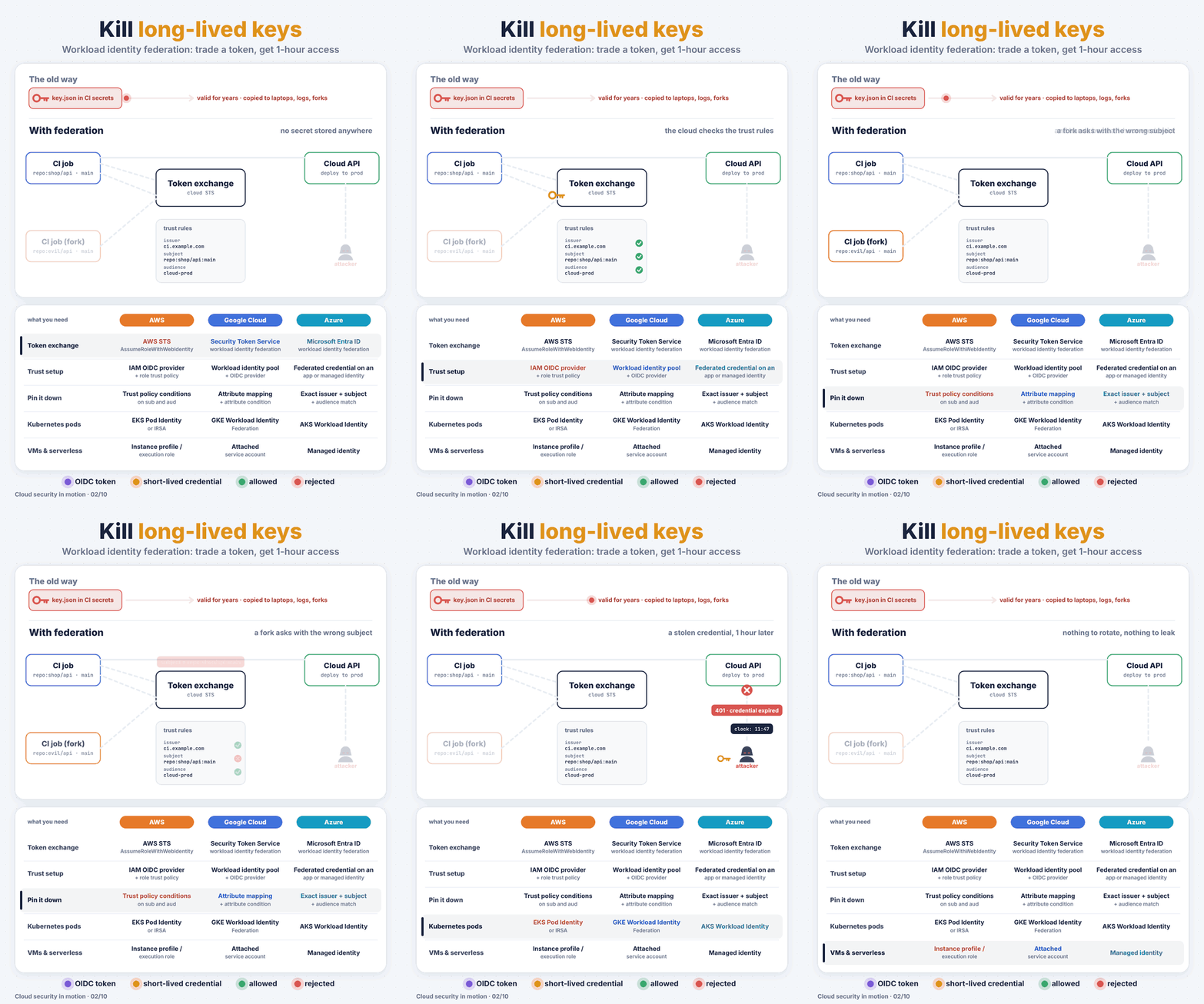
The trade, step by step
- Your CI job asks its own platform for a signed OIDC token. GitHub Actions, GitLab CI and others can all issue one. It's valid for minutes.
- The job hands that token to the cloud's token service.
- The cloud checks its trust rules: who issued the token, which repository and branch it's for, and the intended audience.
- If everything matches, the cloud returns a short-lived credential, usually valid for about an hour.
- The job deploys. Nothing was stored anywhere.
And what goes wrong for an attacker:
- A fork asks with a token whose subject is
repo:evil/api. The subject doesn't match the trust rule, so there's no credential. - Someone steals the credential from a log and tries it later. It has already expired.
Setting it up with GitHub Actions
The job needs permission to request the token:
permissions:
  id-token: write
  contents: read
AWS. Create an IAM OIDC provider for token.actions.githubusercontent.com, then a role whose trust policy pins the repository and branch:
"Condition": {
  "StringEquals": {
    "token.actions.githubusercontent.com:aud": "sts.amazonaws.com",
    "token.actions.githubusercontent.com:sub": "repo:my-org/api:ref:refs/heads/main"
  }
}
In the workflow, aws-actions/configure-aws-credentials with role-to-assume does the exchange.
Google Cloud. Create a workload identity pool and an OIDC provider with an attribute condition such as assertion.repository == 'my-org/api'. Grant the pool's principal access to a service account or directly to resources, then use google-github-actions/auth with workload_identity_provider.
Azure. Add a federated credential to an app registration or a user-assigned managed identity. Issuer and subject must match exactly, for example repo:my-org/api:ref:refs/heads/main. Then use azure/login with the client, tenant and subscription IDs. No secret.
Gotchas
- Always pin the subject. Repository and branch or environment. A trust rule that accepts "any repo in my org" accepts a lot of repos, including the ones an intern creates next year.
- Inside the cloud, use the built-in version. EC2 instance profiles, attached GCP service accounts, Azure managed identities, and for Kubernetes: EKS Pod Identity or IRSA, GKE Workload Identity Federation, AKS Workload Identity. Same idea, no setup per job.
- Block new keys after migrating. On Google Cloud, enforce the
iam.disableServiceAccountKeyCreationorg policy. On AWS, an SCP that deniesiam:CreateAccessKeyfor most roles does the same. Otherwise the keys quietly come back.
Find the keys you still have
# AWS: access keys and when they were last used
aws iam generate-credential-report && aws iam get-credential-report \
  --query Content --output text | base64 -d | cut -d, -f1,9,11

# Google Cloud: user-managed keys on a service account
gcloud iam service-accounts keys list \
  --iam-account=deployer@my-project.iam.gserviceaccount.com --managed-by=user
Every key in that list is a candidate for deletion. Start with the CI ones.