
"Encrypted at rest" means little if the key sits next to the data
How envelope encryption with cloud KMS really protects your data, what key rotation does and doesn't do, and how AWS, Google Cloud and Azure differ.

Every security questionnaire asks "is data encrypted at rest?" and every cloud lets you tick yes without doing anything. Storage services encrypt by default now.
The more useful question is who can decrypt it. That's where customer-managed keys and envelope encryption come in, and it's worth understanding how the pieces fit before you turn them on everywhere.
Two keys, two jobs
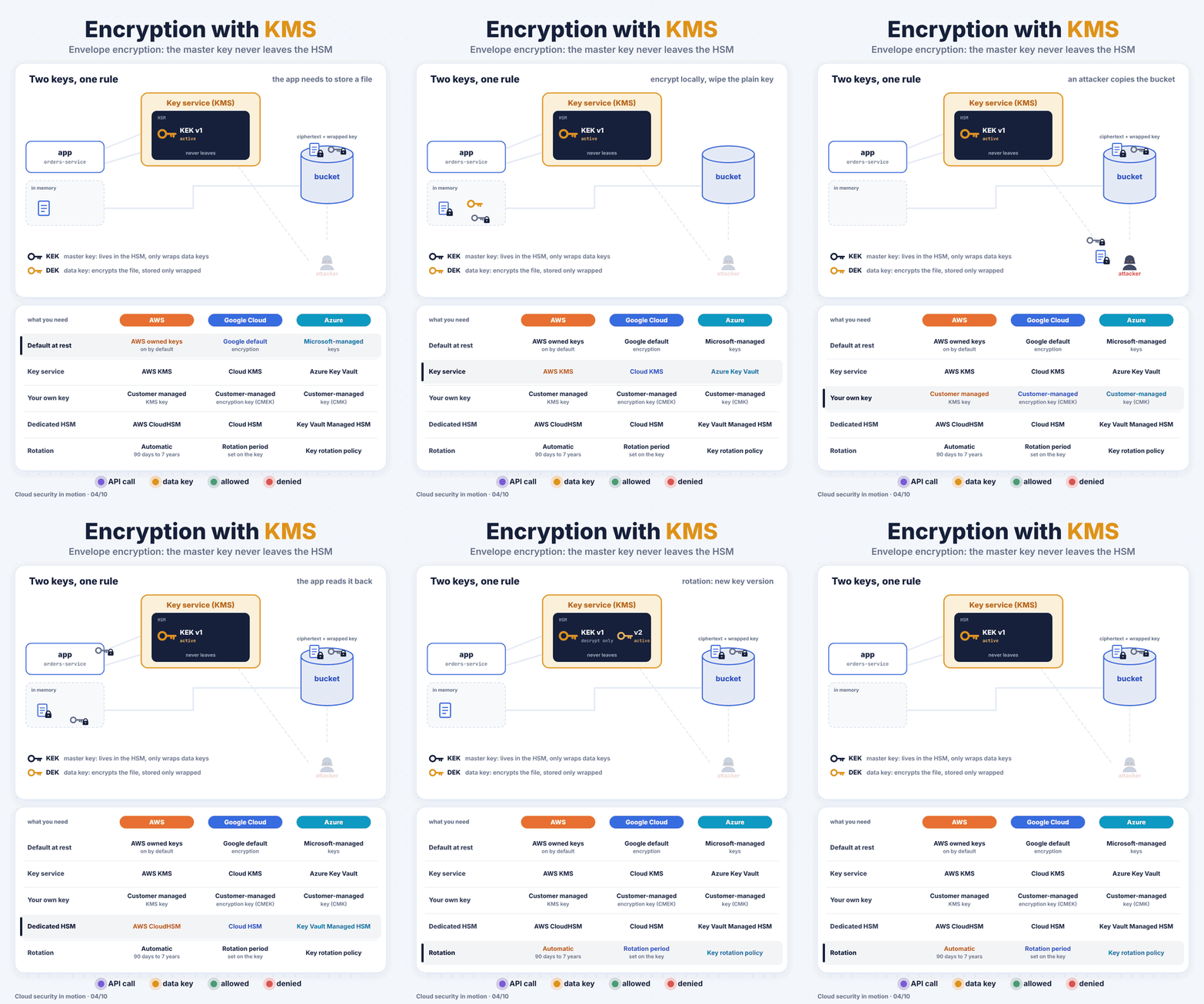
Envelope encryption uses two kinds of key:
- The key encryption key (KEK) lives inside KMS, backed by hardware security modules. It never leaves. You can't download it, even as an admin.
- The data encryption key (DEK) encrypts your actual data. It's only ever stored in wrapped form, encrypted by the KEK.
Why not just send all the data to KMS? Because KMS calls are small and rate-limited. You encrypt gigabytes locally with a fast symmetric key, and only send the tiny DEK to KMS.
The flow
- The app asks KMS for a data key. KMS checks IAM first.
- KMS returns the data key twice: once in plain text, once wrapped by the KEK.
- The app encrypts the file locally and throws the plain-text key away.
- It stores the ciphertext together with the wrapped key.
- To read it back, the app sends the wrapped key to KMS. KMS checks IAM again, logs the call, and returns the plain data key.
On AWS, step 2 is one call:
aws kms generate-data-key --key-id alias/orders --key-spec AES_256
The response has a Plaintext field (use it, then discard it) and a CiphertextBlob (store it next to your data).
Google Cloud KMS doesn't have a "generate data key" call. You generate the DEK yourself, usually with the Tink library, and ask Cloud KMS to wrap it with encrypt. Azure Key Vault works the same way with its wrapKey and unwrapKey operations. Same pattern, slightly different plumbing.
Why this actually protects you
- Someone copies the whole bucket. They have the ciphertext and the wrapped key. Without permission to call
Decrypton the KMS key, it's noise. - You rotate the key. KMS creates a new key version. New data is wrapped with the new version, and old data still decrypts because KMS keeps the old versions. No re-encryption weekend needed.
- You need to kill access fast. Disable the key, and every service using it loses the ability to decrypt. Destroy it, and the data is gone for good. This is sometimes called crypto-shredding.
One thing rotation does not do: it doesn't re-encrypt existing data. If an old key version was compromised, data wrapped with it is still exposed until you re-encrypt it.
Across the three clouds
| AWS | Google Cloud | Azure | |
|---|---|---|---|
| Service | AWS KMS | Cloud KMS | Azure Key Vault / Managed HSM |
| Customer-managed keys on storage, databases | Yes, per service | CMEK on most services | Customer-managed keys per service |
| Automatic rotation | Yes, period configurable | Rotation period on the key | Key rotation policy |
| Dedicated hardware | CloudHSM | Cloud HSM | Managed HSM |
| Deletion safety net | Waiting period of 7 to 30 days | Scheduled destruction delay | Soft delete and purge protection |
Gotchas
- The key policy is the real access control. Treat
kms:Decryptlike read access to every piece of data the key protects. Audit who has it. - Default encryption is already on. Customer-managed keys don't make data "more encrypted". They give you control: who can decrypt, a log of every use, and a kill switch.
- Deleting a key is (almost) forever. All three clouds make you wait through a deletion window for a reason. Disable first, watch for errors, delete much later.
- Cross-account and cross-project access needs permission on both the resource and the key. A missing key grant is a classic cause of "access denied" when everything else looks right.