
Terraform on Google Cloud: how an enterprise should start, and the practices that keep it sane
A practical guide to running Terraform on Google Cloud at company scale: the org, folder and project hierarchy, a bootstrap stage, GCS remote state, parent and child modules, environments/*.tfvars, IAM that doesn't fight itself, and CI with no service account keys.

Most Google Cloud estates don't start with a plan. Someone creates a project from the console to try BigQuery, someone else makes one for a demo, and a year later there are 140 projects, three of them called test, and a billing account everybody is afraid to touch. Then the company decides to "do it properly with Terraform", and the first question is where to even begin.
This guide is the answer I'd give a platform team on day one. It assumes you already know what a resource, a module and a plan are. If you don't, read Terraform best practices and module architecture first: it covers the language, meta-arguments, state, and the modules/ plus environments/*.tfvars layout this article builds on. Here we focus on what's specific to Google Cloud, and on the order to do things in so you don't have to redo them later.
The short version
- Design the resource hierarchy before you write a resource. Organization, folders per environment, projects per workload per environment. In Google Cloud the project is your blast radius, your IAM boundary and your billing line.
- Don't invent a foundation from scratch. Start from Google's Cloud Foundation Fabric (FAST) or the Terraform example foundation, or generate one from Google Cloud Setup, and adapt it.
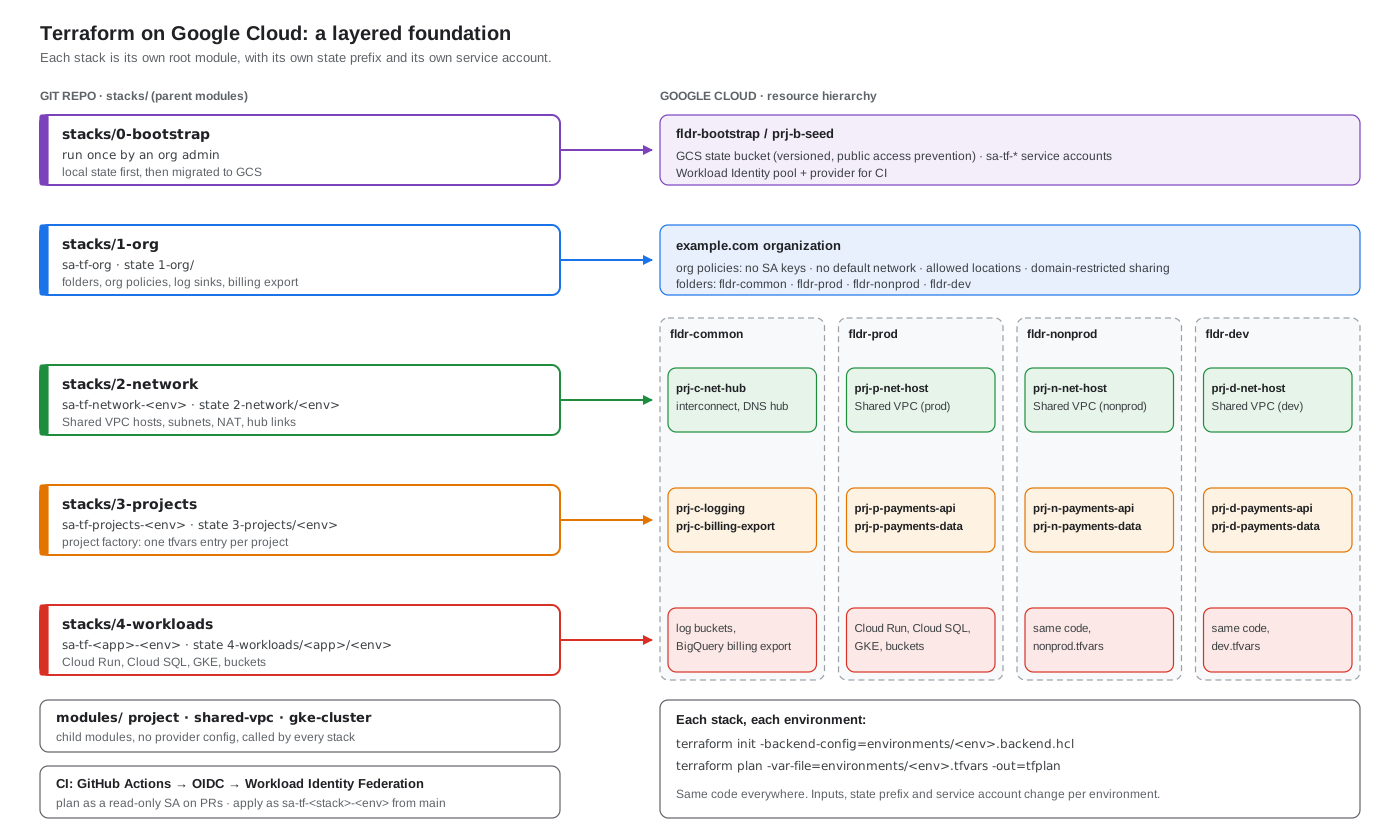
- Build in layers. Bootstrap, then org, then network, then projects, then workloads. Each layer is a separate root module with its own state and its own service account.
- Keep state in GCS, in a seed project nobody else uses. Versioning on, public access prevention on, uniform bucket-level access, one prefix per stack per environment.
- Parent modules compose, child modules do one thing. A
projectchild module that every team gets for free is the single best investment you can make. - One tfvars and one backend file per environment. Same code, different inputs, different state, different identity.
- Use additive IAM resources unless you really mean authoritative.
_memberadds,_bindingowns a role,_policyowns everything. Mixing them is the classic GCP Terraform outage. - No service account keys in CI. GitHub or GitLab authenticates with Workload Identity Federation and impersonates a per-stack Terraform service account.
Step 0: decide the hierarchy
Everything in Google Cloud hangs off a tree: the organization node at the top, folders in the middle, projects at the bottom. Policies and IAM grants flow down the tree. That makes the shape of the tree the most important design decision you'll make, and the hardest to change later.
A layout that works for most companies:
example.com (organization)
├── fldr-bootstrap
│   └── prj-b-seed            # Terraform state, CI service accounts
├── fldr-common
│   ├── prj-c-logging         # org-wide log sinks, audit logs
│   ├── prj-c-billing-export  # BigQuery billing export
│   └── prj-c-net-hub         # interconnect, DNS hub, shared services
├── fldr-prod
│   ├── prj-p-net-host        # Shared VPC host for prod
│   ├── prj-p-payments-api
│   └── prj-p-payments-data
├── fldr-nonprod
│   ├── prj-n-net-host
│   └── prj-n-payments-api
└── fldr-dev
    ├── prj-d-net-host
    └── prj-d-payments-api
A few rules that save pain:
- Environment first, then team. Putting
prod,nonprodanddevat the top means "no public IPs in prod" is one org policy on one folder. If you put teams at the top, every team folder needs its own copy of every guardrail. - One project per workload per environment.
payments-apiin dev and in prod are two projects. Projects are cheap. Untangling a shared one is not. - A naming convention with a prefix and an environment letter. Project IDs are global and can never be reused once deleted, so add a short random suffix in the module (
prj-p-payments-api-7f3a) and keep the readable part as the display name. - Billing goes to the project, not the folder. Use labels (
team,env,cost-center) on every project from the start, and billing export to BigQuery so you can report by label.
If your company has very separate business units, add a level (fldr-retail/fldr-prod), but resist going deeper than that. Every extra level is another place where an inherited policy can surprise you.
Don't start from a blank repo
Google maintains two serious, open-source starting points. Both are written in Terraform and both encode a lot of hard-won defaults.
- Cloud Foundation Fabric, and its FAST setup. A large library of composable modules plus a staged foundation: bootstrap, resource management, security, networking, then project factories. It's opinionated, very configurable through YAML, and moves quickly.
- Terraform example foundation (Cloud Foundation Toolkit). Stages numbered
0-bootstrap,1-org,2-environments,3-networks-*,4-projectsand5-app-infra, built on theterraform-google-modulesregistry modules. Closer to a reference you read and fork.
There's also Google Cloud Setup in the console, which walks an admin through organization, groups, billing, hierarchy, networking and logging, and can hand you the result as Terraform to download instead of applying it with clicks.
My advice: read one of them end to end before you write anything, then either fork it or borrow its structure. Teams that skip this step usually rediscover the same chicken-and-egg problems (where does the state bucket for the state bucket live?) six months in.
The layered layout
The generic guide uses one root module per stack, child modules under modules/, and per-environment inputs in environments/. On Google Cloud that maps neatly onto the hierarchy:
gcp-platform/
├── modules/                     # child modules: do one thing, no provider config
│   ├── project/                 # project + APIs + labels + IAM + budget
│   ├── shared-vpc/              # host project network, subnets, NAT
│   └── gke-cluster/
├── stacks/                      # root (parent) modules: compose children
│   ├── 0-bootstrap/             # run once by an org admin, local state first
│   ├── 1-org/                   # folders, org policies, log sinks
│   ├── 2-network/
│   │   ├── main.tf
│   │   ├── variables.tf
│   │   ├── versions.tf
│   │   ├── providers.tf
│   │   ├── backend.tf
│   │   └── environments/
│   │       ├── dev.tfvars
│   │       ├── dev.backend.hcl
│   │       ├── nonprod.tfvars
│   │       ├── nonprod.backend.hcl
│   │       ├── prod.tfvars
│   │       └── prod.backend.hcl
│   ├── 3-projects/              # project factory: one map entry per project
│   └── 4-workloads/
│       └── payments/
└── .github/workflows/terraform.yml
Each stack under stacks/ is applied on its own. The org stack changes a few times a year and needs org-level permissions. The projects stack changes every week and only needs to create projects in folders. Splitting them keeps plans small, keeps the blast radius small, and lets you give each one a service account with only the roles it needs.
Stacks talk to each other through outputs. A later stack reads an earlier one with terraform_remote_state, or, better for loose coupling, through a data source or a small YAML file the earlier stack writes to the state bucket. Avoid one stack reaching into another's resources directly.
Step 1: bootstrap
Bootstrap is the only stack a human runs by hand. It creates the things every other stack needs:
- the
fldr-bootstrapfolder and theprj-b-seedproject - a GCS bucket for Terraform state
- one service account per stack (
sa-tf-org,sa-tf-network,sa-tf-projects, ...) with the roles that stack needs, at the level it needs them - a Workload Identity pool and provider for your CI system, and the right to impersonate each service account from the matching repository and branch
It starts with local state, because the bucket doesn't exist yet. Once the first apply has created the bucket, add the backend block and migrate:
terraform init -migrate-state -backend-config=environments/bootstrap.backend.hcl
After that, lock it down. The org admin who ran bootstrap should not keep roles/resourcemanager.organizationAdmin as a daily role. Put it behind a break-glass group, and let the stacks do the work through their service accounts.
Remote state on Cloud Storage
The gcs backend stores state as an object and supports locking natively, so there's no extra lock table to manage. The bucket deserves the same care as a production database, because it holds every secret Terraform ever saw.
resource "google_storage_bucket" "tfstate" {
  project                     = google_project.seed.project_id
  name                        = "bkt-${var.org_short}-tfstate"
  location                    = "EU"            # multi-region you're allowed to use
  uniform_bucket_level_access = true
  public_access_prevention    = "enforced"
  force_destroy               = false

  versioning {
    enabled = true
  }

  lifecycle_rule {
    condition {
      num_newer_versions = 30
      with_state         = "ARCHIVED"
    }
    action {
      type = "Delete"
    }
  }

  encryption {
    default_kms_key_name = google_kms_crypto_key.tfstate.id  # optional CMEK
  }

  lifecycle {
    prevent_destroy = true
  }
}
Each stack declares a partial backend and gets the rest from its environment file:
# stacks/2-network/backend.tf
terraform {
  backend "gcs" {}
}
# stacks/2-network/environments/prod.backend.hcl
bucket                      = "bkt-acme-tfstate"
prefix                      = "2-network/prod"
impersonate_service_account = "sa-tf-network@prj-b-seed-4c1d.iam.gserviceaccount.com"
The prefix is where the separation happens: 2-network/dev, 2-network/prod, 3-projects/prod and so on. Grant each stack's service account roles/storage.objectUser on the bucket only through an IAM condition on its own prefix if you want strict isolation; at minimum, keep the bucket's IAM to the Terraform service accounts and a small admin group. Nobody's personal account should be able to read prod state.
One habit that pays off: never edit state by hand. If you need to move or forget a resource, use moved, import and removed blocks in code so the change is reviewed like anything else. Bucket versioning is your undo button if something still goes wrong.
Providers and versions
Pin Terraform and the providers in every root module, and commit .terraform.lock.hcl.
# stacks/2-network/versions.tf
terraform {
  required_version = ">= 1.10, < 2.0"

  required_providers {
    google = {
      source  = "hashicorp/google"
      version = "~> 7.0"
    }
    google-beta = {
      source  = "hashicorp/google-beta"
      version = "~> 7.0"
    }
  }
}
# stacks/2-network/providers.tf
provider "google" {
  impersonate_service_account = var.terraform_service_account
  region                      = var.region
  user_project_override       = true
  billing_project             = var.quota_project

  default_labels = {
    managed-by = "terraform"
    stack      = "2-network"
    env        = var.environment
  }
}
Three Google-specific things in there:
- Impersonation instead of keys. The person or CI job authenticates as itself, then the provider calls the API as the stack's service account. You can see who did it in the audit logs, and nobody holds a key file.
user_project_overrideandbilling_project. Some APIs charge quota to the project that makes the call. Without these, plans fail with confusing "API not enabled on project" errors that point at the seed project.default_labels. Every resource that supports labels gets them, so cost reports and inventory queries work from day one.
Upgrade the provider on purpose, one major at a time, after reading its upgrade guide. Google provider majors change defaults (deletion protection, label handling) that can turn an innocent plan into a replacement.
Parent and child modules
The split that works on Google Cloud is the same as everywhere: child modules wrap one concept and know nothing about environments; parent (root) modules decide what to build where.
The child module every enterprise needs first is project. Every new project should come out of it with the same APIs, labels, budget and baseline IAM, so teams never touch the console to create one.
# modules/project/main.tf
resource "random_id" "suffix" {
  byte_length = 2
}

resource "google_project" "this" {
  name                = var.name
  project_id          = "${var.prefix}-${var.name}-${random_id.suffix.hex}"
  folder_id           = var.folder_id
  billing_account     = var.billing_account
  auto_create_network = false
  deletion_policy     = var.deletion_policy   # "PREVENT" in prod
  labels              = var.labels
}

resource "google_project_service" "apis" {
  for_each = toset(var.apis)

  project            = google_project.this.project_id
  service            = each.value
  disable_on_destroy = false
}

resource "google_project_iam_member" "members" {
  for_each = {
    for binding in flatten([
      for role, members in var.iam : [
        for member in members : { role = role, member = member }
      ]
    ]) : "${binding.role}/${binding.member}" => binding
  }

  project = google_project.this.project_id
  role    = each.value.role
  member  = each.value.member
}
# modules/project/outputs.tf
output "project_id" {
  value = google_project.this.project_id
}

output "number" {
  value = google_project.this.number
}
The parent module is short. It reads a map from the environment's tfvars and calls the child once per entry:
# stacks/3-projects/main.tf
module "project" {
  source   = "../../modules/project"
  for_each = var.projects

  name            = each.key
  prefix          = "prj-${substr(var.environment, 0, 1)}"
  folder_id       = var.folder_ids[var.environment]
  billing_account = var.billing_account
  apis            = each.value.apis
  iam             = each.value.iam
  deletion_policy = var.environment == "prod" ? "PREVENT" : "DELETE"

  labels = merge(each.value.labels, {
    env = var.environment
  })
}
# stacks/3-projects/environments/prod.tfvars
environment = "prod"

projects = {
  payments-api = {
    apis   = ["run.googleapis.com", "secretmanager.googleapis.com", "sqladmin.googleapis.com"]
    labels = { team = "payments", cost-center = "cc-1042" }
    iam = {
      "roles/viewer" = ["group:payments-engineers@example.com"]
    }
  }
  payments-data = {
    apis   = ["bigquery.googleapis.com"]
    labels = { team = "payments", cost-center = "cc-1042" }
    iam    = {}
  }
}
Adding a project is now a pull request that adds six lines to a tfvars file. That's the "project factory" pattern, and it's the moment most teams start trusting the platform.
A few module habits worth keeping:
- Use
for_eachwith stable keys, nevercount, for anything in a map. Remove one item from acountlist and Terraform will want to replace everything after it. - Don't configure providers inside child modules. Let the root pass them in. A child module with its own
providerblock can't be used withfor_eachand makes impersonation impossible to control. - Reuse before you write. The
terraform-google-modulesregistry modules and the Fabric modules already handle a lot of edge cases (Shared VPC attachment, API activation ordering, GKE defaults). Pin them to a version or a Git tag, never a branch.
Environments with tfvars
Same code, different inputs. Each environment gets a tfvars file for values and a backend file for where its state lives:
cd stacks/2-network
terraform init -reconfigure -backend-config=environments/prod.backend.hcl
terraform plan -var-file=environments/prod.tfvars -out=tfplan
On Google Cloud I'd go one step further than the generic guide and make sure each environment differs in identity too. sa-tf-network-prod can only touch the prod folder; sa-tf-network-dev can only touch dev. Then a wrong -var-file flag gives you a permission error instead of a prod outage.
What belongs in tfvars: environment name, folder and billing IDs, CIDR ranges, machine sizes, replica counts, feature flags. What doesn't: secrets. Keep those in Secret Manager and read them at runtime, or pass them in from CI as TF_VAR_ variables marked sensitive. Remember that anything Terraform reads can still end up in state.
IAM without fighting yourself
This is where most GCP Terraform incidents come from. The Google provider has three kinds of IAM resource for each level (organization, folder, project, and most individual resources):
| Resource | What it owns | Use it when |
|---|---|---|
google_project_iam_member |
One member in one role | Almost always. It adds a grant and leaves everything else alone. |
google_project_iam_binding |
The full member list of one role | You want Terraform to remove anyone added to that role by hand. |
google_project_iam_policy |
The entire IAM policy of the project | Rarely. It wipes every grant not in your code, including Google's own service agents. |
The rules:
- Default to
_member. - Never use
_bindingand_memberfor the same role on the same resource. They'll fight on every apply. - Treat
_policyat organization or folder level as a loaded weapon. If you lock yourself out of an organization, getting back in involves Google support. - Grant roles to groups, not people. Joining and leaving teams then happens in your identity provider, not in Terraform.
- Prefer predefined roles over
roles/editorandroles/owner. Basic roles are far broader than anyone needs.
Guardrails as code
Put your organization policies in the 1-org stack so they're reviewed and versioned like everything else:
resource "google_org_policy_policy" "no_sa_keys" {
  name   = "organizations/${var.org_id}/policies/iam.disableServiceAccountKeyCreation"
  parent = "organizations/${var.org_id}"

  spec {
    rules {
      enforce = "TRUE"
    }
  }
}

resource "google_org_policy_policy" "allowed_locations" {
  name   = "folders/${google_folder.prod.folder_id}/policies/gcp.resourceLocations"
  parent = "folders/${google_folder.prod.folder_id}"

  spec {
    rules {
      values {
        allowed_values = ["in:eu-locations"]
      }
    }
  }
}
A good starting set: disable service account key creation, skip default network creation, restrict resource locations, enforce uniform bucket-level access and public access prevention, restrict who can be granted IAM (iam.allowedPolicyMemberDomains), and require OS Login. Newer organizations get several of these enforced by default; codify them anyway so the intent is written down and the next org you build matches.
Two more guardrails worth adding to every stack:
lifecycle { prevent_destroy = true }on state buckets, KMS keys, production databases and anything else that can't be recreated from code.- Deletion protection flags where the resource has them (
deletion_protectionon Cloud SQL, GKE and BigQuery tables,deletion_policyon projects). They protect against a bad plan and a person in the console.
CI/CD without keys
The pipeline should be the only thing that applies to shared environments. A shape that works:
- Pull request opened:
fmt -check,validate,tflintwith the Google ruleset, a policy check, thenplanfor every affected stack and environment. Post the plan summary on the PR. - Plan runs as a read-only service account (
roles/viewerplus the state bucket), so a malicious PR can't change anything. - Merge to main:
applyfor dev and nonprod automatically, prod behind a GitHub environment with required reviewers. - Apply runs as the stack's write service account, which only that repository's
mainbranch is allowed to impersonate.
Authentication uses Workload Identity Federation, the same pattern described in delete the cloud key in your CI pipeline:
permissions:
  contents: read
  id-token: write

jobs:
  plan:
    runs-on: ubuntu-latest
    steps:
      - uses: actions/checkout@v4
      - uses: google-github-actions/auth@v2
        with:
          workload_identity_provider: projects/123456789/locations/global/workloadIdentityPools/github/providers/acme
          service_account: sa-tf-network-plan@prj-b-seed-4c1d.iam.gserviceaccount.com
      - uses: hashicorp/setup-terraform@v3
      - run: |
          cd stacks/2-network
          terraform init -backend-config=environments/prod.backend.hcl
          terraform plan -var-file=environments/prod.tfvars -out=tfplan -lock-timeout=5m
In the bootstrap stack, the provider's attribute condition is what keeps it safe: allow only your GitHub organization, and only the exact repository. Then grant roles/iam.workloadIdentityUser on each service account to a principal set narrowed to that repository and, for write accounts, the main branch or a deployment environment.
If you'd rather not run the pipeline yourself, Google's Infrastructure Manager runs Terraform as a managed service with Cloud Build underneath. It works fine for workload stacks; most enterprises still keep the foundation stacks in their own CI so they control the approval flow.
Bringing existing projects under Terraform
You almost certainly have resources already. Don't try to import everything on day one. Bring the foundation (folders, org policies, networking) under code first, then import projects as teams move onto the factory.
Terraform's import block makes this reviewable:
import {
  to = module.project["payments-api"].google_project.this
  id = "legacy-payments-prod"
}
Run terraform plan -generate-config-out=generated.tf to have Terraform write a first draft of the configuration, then clean it up into your modules. For a whole project, gcloud beta resource-config bulk-export --resource-format=terraform --project=PROJECT_ID can export a snapshot to start from. Treat the output as a draft: it's verbose and doesn't know about your modules.
Detecting drift
People will change things in the console during an incident. That's fine, as long as you find out. Run a scheduled terraform plan -detailed-exitcode for every stack and environment (nightly is plenty); exit code 2 means something drifted, so open an issue or post to a channel. Cloud Asset Inventory and audit logs tell you who made the change.
Don't fix drift by running apply blindly. Decide whether the code or the console was right, then update the other one.
A 90-day plan for an enterprise
Weeks 1 to 2: decide. Agree the hierarchy, naming, labels, regions, and which foundation (Fabric FAST or the example foundation) you'll start from. Set up groups in your identity provider (gcp-org-admins, gcp-billing-admins, gcp-network-admins, gcp-security-admins, and so on).
Weeks 3 to 4: bootstrap and org. Run bootstrap, migrate its state, wire up Workload Identity Federation. Apply the org stack: folders, org policies, central logging sink, billing export. Remove standing org admin rights from people.
Weeks 5 to 8: network and project factory. Shared VPC host projects per environment, or the hub-and-spoke design if you need hybrid connectivity. Ship the project module and onboard two friendly teams.
Weeks 9 to 12: scale and harden. Policy checks in CI, drift detection, budgets and alerts per project, module versioning and a changelog. Start importing existing projects team by team.
By the end, a new team gets a project in every environment, wired to the network, with logging, budgets and least-privilege IAM, by opening one pull request.
Mistakes I see most often
- One giant root module for the whole org. Plans take ten minutes, everyone needs org-admin to run them, and one bad change can touch everything.
- Creating the default network. Always set
auto_create_network = falseand enforcecompute.skipDefaultNetworkCreation. google_project_iam_policyin a module that teams reuse. Every apply removes something somebody else granted.- Disabling APIs on destroy. Set
disable_on_destroy = falseongoogle_project_service, or destroying one resource can turn off an API another stack depends on. - Personal credentials for prod applies. If prod changes come from laptops, you can't tell what was reviewed and what wasn't.
- Hard-coded project IDs everywhere. Pass them in through variables and outputs, so the same code works in every environment.
- Unpinned modules.
?ref=mainmeans the next plan can change behavior without anyone touching your code.
References
- Terraform best practices and module architecture (the generic guide this one builds on)
- Best practices for using Terraform on Google Cloud
- Google Cloud enterprise foundations blueprint
- Terraform example foundation
- Cloud Foundation Fabric and FAST
- Store Terraform state in a Cloud Storage bucket
- Google provider: IAM policy for projects
- Organization policy constraints
- Workload Identity Federation with deployment pipelines
- Infrastructure Manager overview