
What is MCP? The Model Context Protocol, best practices, and why MCP gateways matter
How the Model Context Protocol works, a real tool call step by step, best practices for servers and teams, where the spec is heading in 2026, and what MCP gateways and control planes add.

A language model on its own can only talk. To be useful at work it has to do things: read a ticket, query a database, open a pull request, check a dashboard. For the first couple of years of the LLM boom, every AI application wired those capabilities up by hand, one custom integration at a time.
The Model Context Protocol (MCP) changed that. It is an open standard for connecting AI applications to tools and data, and in about two years it went from an Anthropic side project to the default way agents reach the outside world. This article explains what MCP is, walks through a real tool call, lists the best practices that matter in production, and looks at where the ecosystem is going, including the newest layer of the stack: MCP gateways and control planes.
The problem MCP solves
Imagine three AI applications (a chat assistant, an IDE agent and a support bot) and four systems they need (GitHub, Postgres, Slack and your document store). Without a standard, that is twelve integrations, each with its own auth, error handling and quirks. Add one more app and you write four more.
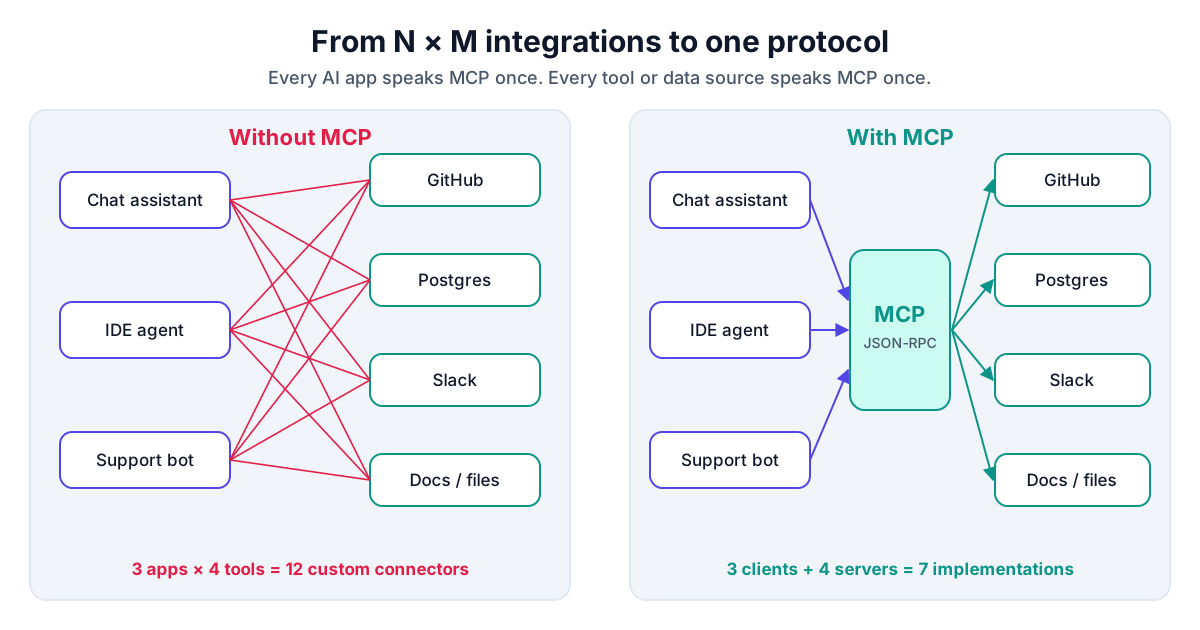
MCP turns that N × M problem into N + M. Each AI application implements an MCP client once. Each tool or data source is wrapped in an MCP server once. Any client can then use any server. It is the same move that the Language Server Protocol made for code editors, and the comparison is deliberate: MCP borrows LSP's idea of a small, well-specified JSON-RPC protocol between a smart host and many capability providers.
What MCP is, precisely
Anthropic released MCP as an open specification in November 2024. In December 2025, Anthropic donated it to the newly formed Agentic AI Foundation (AAIF) under the Linux Foundation, so the protocol is now governed by a vendor-neutral body rather than a single company. The spec is versioned by date; the current revision at the time of writing is 2026-07-28.
MCP has three roles:
- Host: the AI application the user interacts with, such as Claude, ChatGPT, VS Code, Cursor or your own agent. It owns the model and the user's trust decisions.
- Client: a connector inside the host. Each client talks to exactly one server.
- Server: a program that exposes capabilities, such as a GitHub server, a filesystem server, or a wrapper around your internal API.
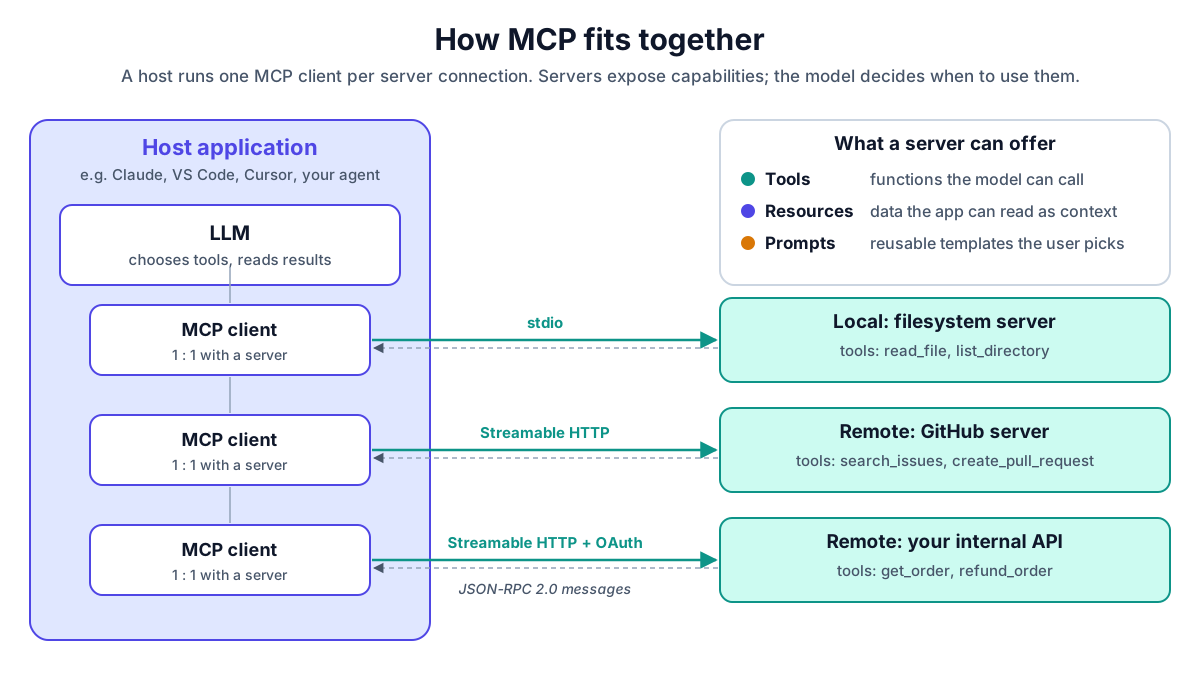
Servers offer three kinds of things:
| Primitive | What it is | Who controls it | Example |
|---|---|---|---|
| Tools | Functions the model can call | The model | search_issues, create_pull_request |
| Resources | Data the application can read as context | The application | a file, a database schema, a log |
| Prompts | Reusable templates | The user | "Summarize this PR for release notes" |
Messages are JSON-RPC 2.0, carried over one of two standard transports: stdio for local servers that the host starts as a subprocess, and Streamable HTTP for remote servers. Remote servers use OAuth 2.1 for authorization: the server publishes Protected Resource Metadata (RFC 9728) so a client can find the right authorization server, and the client asks for a token whose audience is that specific server (RFC 8707 resource indicators).
A real tool call, step by step
Say you ask an agent: "Which open issues mention the login bug?" and it has GitHub's official MCP server connected.
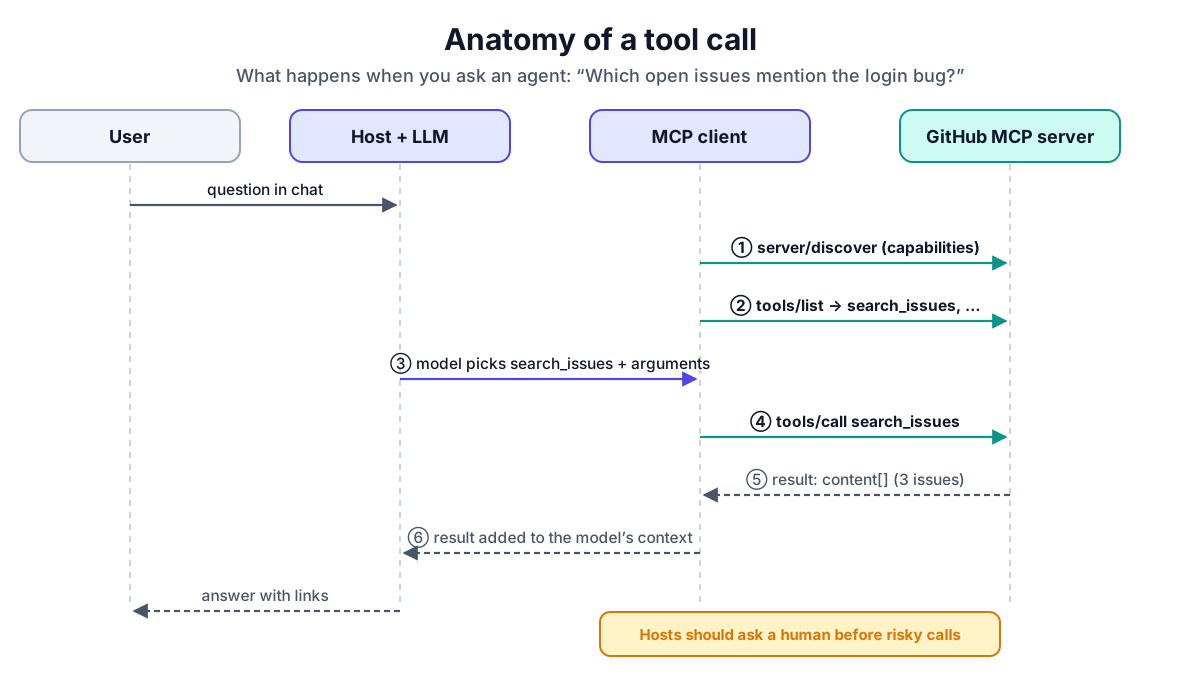
- The client asks the server what it supports (in the 2026-07-28 spec this is
server/discover; older revisions used aninitializehandshake). - The client calls
tools/listand receives each tool's name, description, JSON Schema for its input, and optional behavior hints. - The host puts those tool definitions in front of the model. The model decides to call
search_issuesand produces arguments. - The client sends the call:
{
  "jsonrpc": "2.0",
  "id": 7,
  "method": "tools/call",
  "params": {
    "name": "search_issues",
    "arguments": { "query": "login bug is:open" }
  }
}
- The server runs the search against GitHub's API and returns content blocks:
{
  "jsonrpc": "2.0",
  "id": 7,
  "result": {
    "resultType": "complete",
    "content": [
      { "type": "text", "text": "#482 Login fails after SSO redirect ..." }
    ],
    "isError": false
  }
}
- The host adds the result to the model's context, and the model writes the answer.
(The 2026-07-28 revision also attaches protocol version and client information to every request in a _meta field; it is left out above for readability.)
Getting started locally is just as concrete. This entry in Claude Desktop's claude_desktop_config.json runs the official reference filesystem server over stdio, limited to one folder:
{
  "mcpServers": {
    "filesystem": {
      "command": "npx",
      "args": ["-y", "@modelcontextprotocol/server-filesystem", "/Users/me/projects"]
    }
  }
}
Other real servers worth knowing: GitHub's official server (also hosted remotely at https://api.githubcopilot.com/mcp/), the reference servers in the modelcontextprotocol/servers repository (filesystem, fetch, git, memory, time), and thousands of community servers listed in the official MCP Registry at registry.modelcontextprotocol.io.
How AI is evolving around MCP
Agents, not chatbots. The shift from "answer a question" to "complete a task" is what made MCP matter. Coding agents edit repositories, open pull requests and run tests through tools; support agents read tickets and issue refunds. Every major AI host now speaks MCP, so a server written once reaches all of them.
The protocol is growing up for scale. The 2025-11-25 revision added OpenID Connect discovery, icons, URL-mode elicitation and incremental scope consent, and recommended Client ID Metadata Documents for client registration. The 2026-07-28 revision is the bigger break:
- Stateless by design. Protocol-level sessions and the
initializehandshake are gone; each request carries what the server needs. That makes MCP servers easy to run behind ordinary load balancers. server/discoverreplaces the handshake for finding out what a server offers.- Extensions. Long-running tasks and MCP Apps (interactive UI) become opt-in, versioned extensions instead of core features.
- Multi round-trip requests. When a server needs more input mid-call, it returns
input_requiredand the client retries with answers, replacing server-initiated sampling, roots and elicitation requests. Sampling, roots and logging are deprecated, as is OAuth Dynamic Client Registration. - Required headers. HTTP requests carry
Mcp-MethodandMcp-Name, so infrastructure can see which method and tool a request is for without parsing the body.
That last point is a hint about where things are heading: the spec now assumes there is infrastructure in the middle.
Security became the main conversation. As MCP spread, so did real incidents:
- Toxic agent flows. In May 2025, Invariant Labs showed that a malicious issue in a public GitHub repository could instruct an agent with GitHub MCP access to leak data from the user's private repositories. Nothing was wrong with the server; the problem was an over-privileged agent reading untrusted text.
- Supply chain. In September 2025, Koi Security found
postmark-mcp, an npm package that looked like a legitimate email server and, from version 1.0.16, quietly BCC'd every email to an attacker. - Client vulnerabilities. CVE-2025-6514 (reported by JFrog, July 2025) let a malicious remote server run commands on the machine of anyone connecting with
mcp-remoteversions before 0.1.16.
The lesson is that MCP is a powerful capability channel, and capability channels need governance.
Best practices
For people building MCP servers
- Design tools for the model, not your API. Expose task-level tools (
find_customer_orders) rather than mirroring every endpoint. Fewer, well-described tools mean better choices and less context spent on tool definitions. - Write precise descriptions and strict schemas. The description is the model's only documentation. Use JSON Schema with required fields, enums and limits, and validate input on the server anyway.
- Declare behavior hints honestly. Mark tools with
readOnlyHint,destructiveHintandidempotentHint. Hosts and gateways use them to decide when to ask a human. Remember they are hints: a client should not trust them from an unknown server. - Return errors the model can act on. Use
isError: truewith a message that says what to fix ("date must be YYYY-MM-DD"), not a stack trace. - Never pass tokens through. The spec is explicit: an MCP server must not pass on the token it received from the client, and must only accept tokens issued for it as the audience. If you call a downstream API, use your own credential or a token exchange.
- Keep it stateless. Follow the 2026 direction: no hidden per-connection state, so you can scale horizontally.
For teams adopting MCP
- Least privilege per agent. Give each agent only the servers and tools its job needs. A read-only token cannot be tricked into deleting anything.
- Treat tool output as untrusted input. Issues, emails, web pages and tool descriptions can all carry prompt injection. Keep a human in the loop for destructive or outbound actions.
- Pin and vet servers. Install from known publishers, pin versions, review updates, and prefer servers listed in a registry you trust.
- Validate
Originand bind local servers to localhost. The spec requires Streamable HTTP servers to validate theOriginheader to stop DNS-rebinding attacks. - Log every call. You need to answer "which agent called which tool, when, and was it allowed?" after the fact, without storing sensitive arguments.
The last five are hard to enforce one server at a time. That is why gateways exist.
MCP gateways and control planes
An MCP gateway is a single entry point between agents and MCP servers. Instead of each agent connecting directly to dozens of servers, all traffic passes through one place that can authenticate the caller, check policy, strip credentials, record an audit trail, and route to the right server.
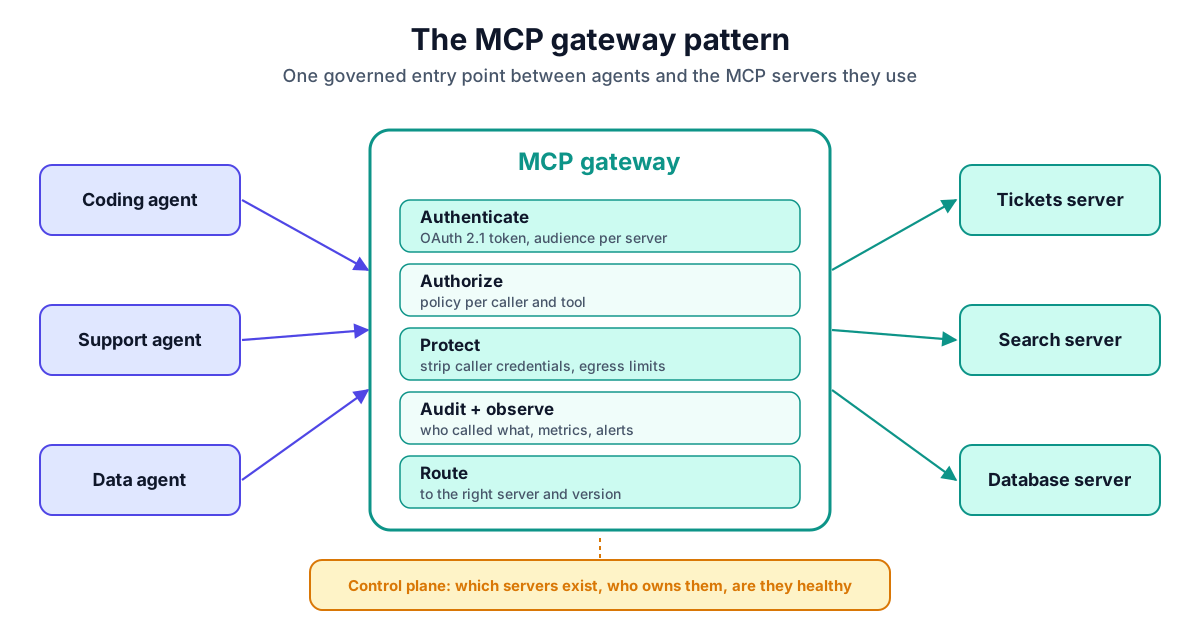
A gateway alone answers "is this call allowed?". A control plane answers the questions around it: which MCP servers exist, who owns them, which tools they offer right now, and whether they are healthy. The two together play the same role for MCP that API gateways and service meshes play for microservices.
Example: Kavrynt
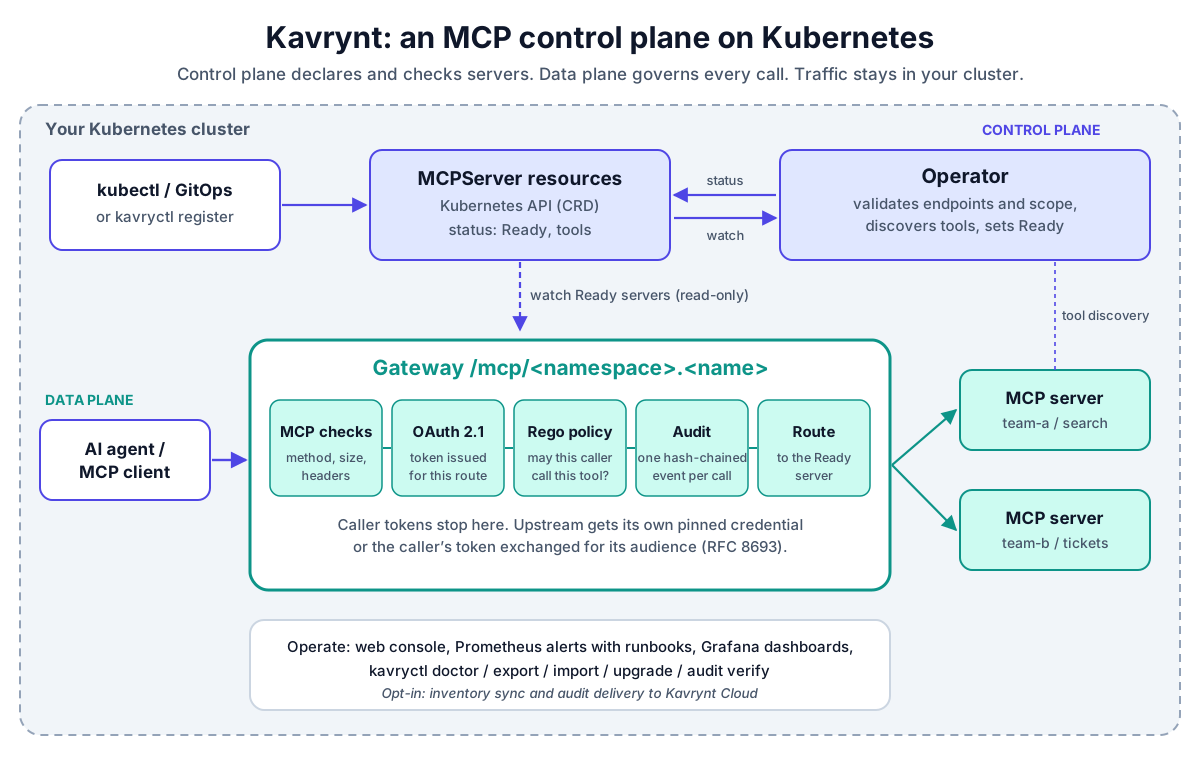
Kavrynt is an open source (Apache 2.0) MCP control plane for Kubernetes. It is currently in beta. It has three parts:
MCPServerresources. Teams declare MCP servers as Kubernetes custom resources, applied withkubectl, GitOps or thekavryctlCLI.- An Operator that validates each server, checks its endpoint stays within its team's namespace, discovers its tools (
tools/list) into the resource's status, and marks itReady. - A Gateway that watches
Readyservers and routes MCP traffic to them at/mcp/<namespace>.<name>.
Registering a server is a short manifest:
apiVersion: kavrynt.io/v1alpha1
kind: MCPServer
metadata:
  name: tickets
  namespace: team-a
spec:
  version: 1.0.0
  transport: http
  endpoint: http://tickets.team-a.svc.cluster.local:8080/mcp
  tokenExchange:
    audience: https://tickets.example.com
    scopes:
      - tickets:read
After that, kubectl get mcpservers is your MCP inventory, including each server's discovered tools.
On the traffic side, the Gateway applies several of the best practices above for every server at once:
- Authentication on by default. The Gateway acts as an OAuth 2.1 resource server. Each route has its own token audience and Protected Resource Metadata, so a token for one server is refused by the others.
- No token passthrough. The caller's
Authorization,CookieandProxy-Authorizationheaders never reach the MCP server. A server gets either its own stored credential, pinned to its endpoint, or the caller's token exchanged for one with the server's audience (RFC 8693), as in theticketsexample above. - Policy per tool (opt-in). Rego policy, evaluated by OPA inside the Gateway, decides each call from the verified caller, the tool, and the tool's discovered behavior hints. Errors deny. Kavrynt's examples include a policy that lets only ops clients call tools that may be destructive, treating tools without hints, or from servers that are not on a trusted list, as destructive. With list filtering on, each agent's
tools/listshows only the tools it may call. - Audit (opt-in). One hash-chained JSON event per MCP request, never including arguments, results or tokens, verifiable with
kavryctl audit verify. - Only MCP passes. Request size limits, JSON-only
POSTs, checked method and tool names, no followed redirects, and refused cloud-metadata and loopback addresses.
It also ships the day-two pieces a platform team expects: a read-only web console, Prometheus alerts with runbooks, Grafana dashboards, and kavryctl doctor, upgrade and rollback.
To be clear about scope: Kavrynt proxies HTTP MCP servers (stdio servers need an HTTP bridge), routes to servers that already run in your cluster rather than deploying them, and does not yet support human approvals for sensitive calls; that is next on its roadmap. A hosted Kavrynt Cloud control plane for cross-cluster inventory is in development.
Conclusion
MCP gave AI applications a common way to reach tools and data, and that standard is now governed in the open and maturing quickly: stateless, extensible, and built with infrastructure in mind. The hard part has moved from connecting agents to governing them: which agent may call which tool, with whose credentials, and with what record.
If you are building servers, design small, honest, stateless tools and never pass tokens through. If you are adopting MCP across a team, put an MCP gateway and control plane in front of your servers early, before your agents' reach outgrows your ability to see it.
Disclosure: I work on Kavrynt.
Further reading on this site
- Observing AI agents and MCP tool calls, end to end
- I pentested my own AI-agent guardrails. One character got a DELETE through.