
Designing a scalable e-commerce platform: the requirements, the numbers and an architecture that survives Black Friday
A cloud-neutral system design for an online store: requirements, back-of-the-envelope traffic and storage estimates, the services from catalog to payments, a reference architecture, and three real production failures with the fixes. Four editable draw.io diagrams included.

An online store looks simple from the outside. A product page, a cart, a button that says "Place order". Then one night a year, at midnight, a million people press that button within the same quarter of an hour, and every shortcut you took in the design shows up at once: the database that was fine at 300 queries a second, the payment call with no timeout, the stock check that reads before it writes.
This is the first article in a ten-part series on building e-commerce platforms that scale. It is cloud-neutral on purpose. Before you pick a single AWS, Azure or Google Cloud service, you need to know what the system has to do, how big it is, where the data lives and which parts must never be wrong. Later parts map this design onto each cloud.
I'll use one running example throughout: a mid-sized retailer selling electronics and home goods in Europe, with web and mobile storefronts, about 2 million products and a Black Friday that is ten times a normal day. Every number below comes from that example, so you can redo the maths with your own.
The short version
- Split the platform into a browse side and a buy side. Browsing is 98% of traffic and can be a few seconds stale. Buying is 2% of traffic and must be exactly right. They get different stores, different caching rules and different on-call priorities.
- Do the numbers before the architecture. Peak requests per second, orders per second and the size of the hot data decide almost every choice that follows. For our retailer: 9,000 requests a second on a normal evening, 180,000 at Black Friday midnight, 55 orders a second.
- Make the edge do most of the work. A CDN that serves product pages, a WAF that blocks bots, and a waiting room for the known peaks. In our example 92% of requests never reach a server you run.
- Each service owns its data. Catalog, cart, inventory, orders and payments each have their own store. Services share events, not tables.
- Make every write in checkout safe to retry. Idempotency keys from the client, an order id as the payment key, reservations that expire, and an outbox so events are never lost.
- Never trust "read, check, write" for stock. Use one atomic conditional update, and split hot products across several rows.
- Pre-scale for peaks you know about. Autoscaling handles surprises. It is too slow for midnight on Black Friday.
- Alert on orders per minute and payment success rate. CPU is a symptom. Lost orders are the problem.
Step 1: requirements
Most design reviews I've seen go wrong because nobody wrote down what "scalable" means for this business. Write it down first, with numbers, and get the product owner to agree to it.
Functional requirements
What the platform has to do, kept to the things that change the architecture:
- Browse: product listing pages, product detail pages, search with filters (brand, price, rating, availability), recommendations.
- Price and promotions: price books per country, time-boxed sales, coupon codes, "buy 2 get 1" rules. Prices must be the same on the product page, in the cart and at checkout, or you will get complaints and, in the EU, regulators.
- Cart: works for guests, survives a browser restart, merges with the saved cart when the shopper logs in.
- Checkout: address, delivery option, tax, payment by card, wallet or pay-later, order confirmation.
- Inventory: stock per warehouse, reserved quantities, no overselling, back-in-stock alerts.
- Orders: order history, cancellation, returns, refunds, status updates by email and push.
- Partners: marketplaces pull product feeds and push orders through an API.
- Operations: merchandisers change products and prices; support agents look up and fix orders.
Non-functional requirements
These are the ones that drive cost and complexity. Agree them as service level objectives (SLOs), not wishes:
| Requirement | Browse | Buy (cart, checkout, payment) |
|---|---|---|
| Availability SLO (monthly) | 99.9% | 99.95% |
| Latency, p95 at the API | under 200 ms | under 1.5 s for "Place order" |
| Data freshness | up to 60 s stale is fine for product data; price changes within 5 s | must be exact |
| Consistency | eventual | strong for stock and money |
| Peak load to design for | 10x normal | 10x normal, plus 3x on a single hot product |
| Data loss tolerance (RPO) | rebuildable from source | zero for confirmed orders and payments |
| Recovery time (RTO) | 15 minutes | 15 minutes |
Two things in that table matter more than they look. First, the buy path has a higher availability target than browse, because an hour of failed checkouts on Black Friday is a measurable loss and an hour of slow recommendations is not. Second, the hot product: one doorbuster TV can get more traffic than the rest of the catalog combined, and averages hide that.
Also write down the constraints you can't negotiate: card data stays inside a PCI DSS scope that is as small as possible (ideally the payment provider's hosted fields, so card numbers never touch your servers), customer data stays in the EU, and accessibility rules apply to the storefront.
Step 2: back-of-the-envelope numbers
You don't need precise numbers. You need numbers within a factor of two, because they tell you whether a choice is comfortable or dangerous.
Traffic
| Input | Normal day | Black Friday |
|---|---|---|
| Visitors per day | 1.5 M | 15 M |
| Page views per visit | 25 | 18 |
| API calls per page view (after the BFF) | 4 | 4 |
| API calls per day | 150 M | 1.1 B |
| Average API rate | 1,700 req/s | 12,500 req/s |
| Peak API rate (busiest minute) | 5,200 req/s | 14,400 req/s at origin |
| Requests at the edge (images, JS, pages) at peak | 9,000 req/s | 180,000 req/s |
| Conversion rate | 2.5% | 5% |
| Orders per day | 37,500 | 750,000 |
| Peak orders per second | 1.5 | 55 |
The shape is what matters. Browse traffic grows 10x on the day, but the edge numbers grow 20x because all of it arrives in the first hour. Orders grow even more, because conversion doubles when prices drop. A design that is sized on the daily average is useless; you size on the busiest minute.
The read to write ratio on the browse side is about 100 to 1. On the buy side it's closer to 3 to 1: every cart change is a write, and every order touches four stores.
Storage
| Data | Size | Growth | Notes |
|---|---|---|---|
| Product catalog (2 M SKUs x 5 KB) | 10 GB | slow | fits in memory on one cache node, many times over |
| Product images (2 M x 8 images x 300 KB, plus resized copies) | 10 TB | 1 TB/year | object storage behind the CDN |
| Search index | 25 GB | slow | rebuilt from catalog events |
| Active carts (2 M x 2 KB, 30-day TTL) | 4 GB | flat | key-value store |
| Orders (14 M/year x 5 KB with lines and history) | 70 GB/year | steady | relational; the hottest data is the last 90 days |
| Payments ledger (3 entries per order) | 40 GB/year | steady | append-only, kept 10 years for audit |
| Clickstream events (500 M/day x 0.5 KB) | 250 GB/day | fast | goes straight to the warehouse, not to an operational DB |
The surprise for most teams is how small the transactional data is. Seventy gigabytes of orders a year fits on one well-run relational database for a long time. You shard orders not because of size, but because of write throughput and blast radius at peak, and you can delay that decision longer than you think. The data that is big (images, clickstream) is also the data that doesn't need a database.
Bandwidth and the cache you need
At 1.2 MB of images and scripts per page view, a normal day is about 45 TB of CDN egress, and Black Friday about 320 TB. That's the line item that justifies spending time on image formats (AVIF and WebP, resized per device). At 92% CDN hit rate the origin serves about 25 TB on the big day; at 70% it would be 96 TB, plus four times the servers to send it. The CDN hit rate is a capacity number, not a performance nicety.
Step 3: the services
Here is the split I'd start with. It's not the only possible one, and part 2 of this series argues about whether these should be separate services at all or modules in one deployable. The boundaries matter more than the deployment unit: each one owns its data and nobody else writes to it.
| Service | Owns | Store | Consistency | How it scales |
|---|---|---|---|---|
| Catalog | products, variants, attributes, media links | document DB with read replicas, cache in front | eventual, seconds | read replicas and cache; writes are rare |
| Search | the search index | search engine, rebuilt from events | eventual, seconds | replicas of the index |
| Pricing and promos | price books, promotions, coupon rules | relational, heavily cached | price changes within 5 s | cache with event-driven invalidation |
| Recommendations | models, precomputed lists | key-value | eventual, hours | fully optional, has a cached fallback |
| Cart | carts by session and customer | key-value with TTL | read your own writes | partition by cart id |
| Checkout | checkout sessions, idempotency keys | key-value plus its calls to others | strong per request | stateless pods; pre-scaled |
| Inventory | on hand, reserved, sold per SKU and warehouse | relational | strong | row-level atomic updates, hot SKUs split |
| Payments | payment intents, provider references | relational plus append-only ledger | strong | partition by order id; two providers |
| Orders | orders, lines, status history | relational, sharded by customer id | strong | shards; old orders archived |
| Customer and identity | accounts, addresses, consents | relational plus identity provider | strong | rarely the bottleneck |
| Notifications | templates, delivery status | queue plus provider | at least once | consumers scale on queue depth |
A few decisions in that table are worth explaining.
Catalog is a document store, not a set of relational tables. Electronics have 40 attributes, sofas have 12 different ones. A document per product with a flexible attribute map avoids an entity-attribute-value schema that nobody can query. Search, not the catalog database, answers "all 55-inch TVs under 600 euros", so the catalog store only needs fetch by id and by category.
Cart is a key-value store with a TTL. A cart is read and written as one object, is useless after 30 days and is never joined with anything. A relational table for carts tends to become the biggest, least useful table in the database. When the shopper logs in, merge the guest cart into the saved one and delete the guest key.
Prices are read from pricing at checkout, never trusted from the cart. The cart can show a cached price; checkout recalculates and, if it changed, tells the shopper before taking money.
Inventory is relational and boring on purpose. It's the one place where a race condition costs real money, and a relational database with row locks and conditional updates is the most predictable tool for that. More on this in the oversell scenario below.
Payments keep an append-only ledger. Every authorization, capture, refund and chargeback is a new row. You never update an amount. Finance can rebuild any balance from the ledger, and so can you, at 3 a.m., when the provider's numbers don't match yours.
Step 4: the reference architecture
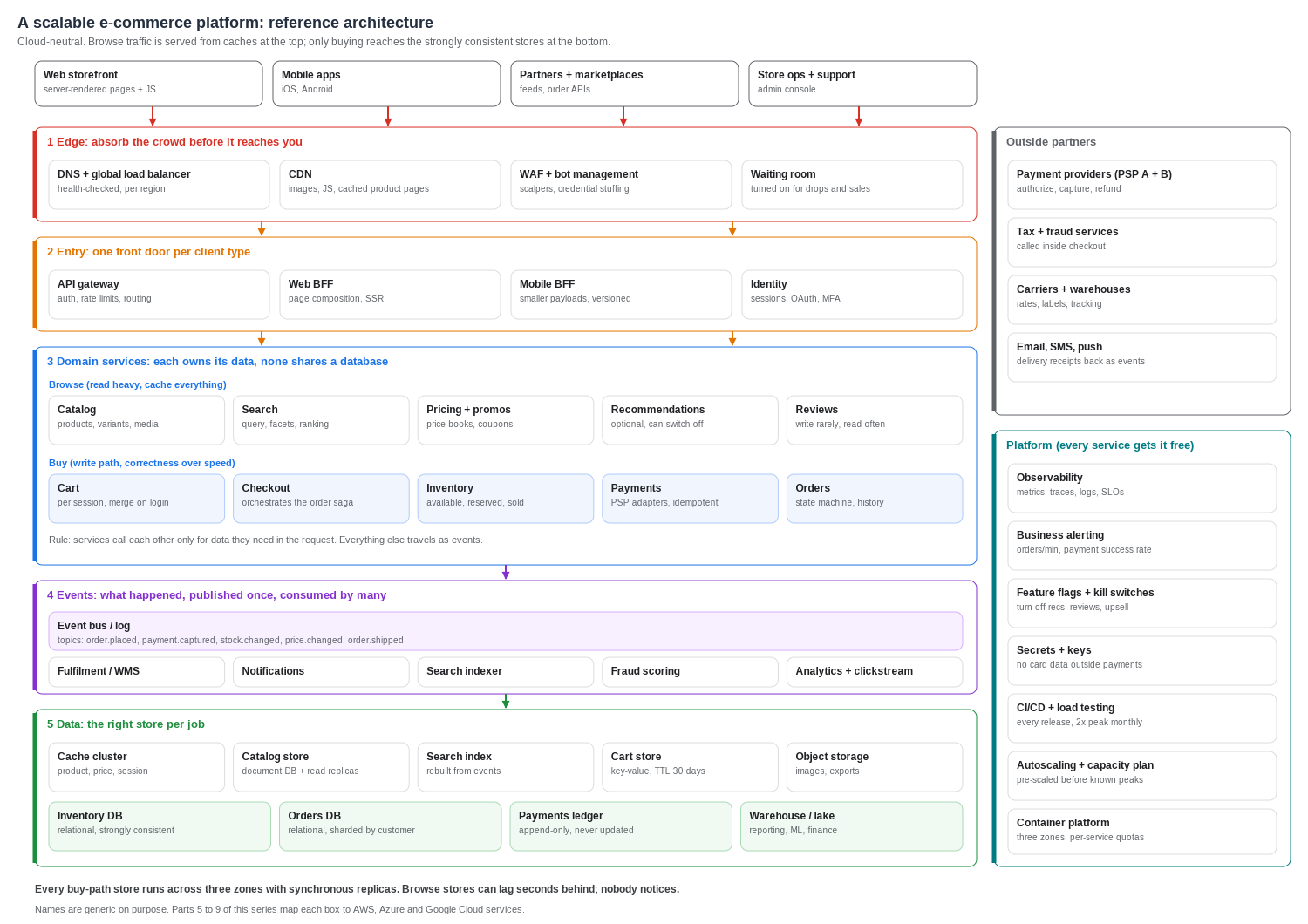
The diagram at the top of this article shows the whole thing. Read it in layers, from the shopper down.
Edge. DNS and a global load balancer send shoppers to the nearest healthy region. The CDN serves images, scripts and, importantly, whole product pages for anonymous shoppers, cached for 60 seconds with stale-while-revalidate. The WAF and bot management block credential stuffing and the scalper bots that show up for every limited drop. The waiting room is off most of the year and turned on for known peaks. It lets a fixed number of new sessions in per minute and shows everyone else a queue page served from the edge.
Entry. One API gateway handles authentication, rate limits per session and per API key, and routing. Behind it, a backend-for-frontend (BFF) per client type composes pages: the web BFF renders server-side for speed and SEO, the mobile BFF returns smaller, versioned payloads so an old app version keeps working when the backend changes.
Domain services. Browse services are read-heavy and lean on caches. Buy services are write-heavy and lean on correctness. The rule written on the diagram is the one that keeps this maintainable: services call each other synchronously only for data they need to answer the current request. Checkout calls inventory to reserve stock because it can't continue without the answer. Checkout does not call notifications to send the confirmation email; it publishes an event.
Events. An event bus (a log like Kafka or a managed equivalent) carries facts: order.placed, payment.captured, stock.changed, price.changed. Search, fulfilment, fraud, notifications and analytics each consume what they need at their own pace. When the warehouse system is slow on Black Friday, orders pile up in a topic instead of failing at checkout.
Data. The right store per job, as in the table above. Every store on the buy path runs across three availability zones with synchronous replication, so losing a zone loses no confirmed order.
Platform. Observability, feature flags, secrets, CI/CD and capacity planning are provided once and used by every service. The ones that matter most for e-commerce are business alerting (orders per minute, payment success rate) and kill switches that turn off non-essential features under load.
Step 5: the browse path and the buy path
The single most useful idea in this design is that the two halves have different rules.
On the browse path, a product page is assembled from catalog, price, stock level ("only 3 left"), reviews and recommendations. Each of those is cached with its own time to live: product content 5 minutes, price 30 seconds with event-based invalidation, stock level 10 seconds, reviews 1 hour. If recommendations are slow, the page renders without them after a 150 ms budget. If reviews are down, the page shows "Reviews are unavailable". The page never waits for the slowest part.
Because of that, the browse databases see very little traffic. In our Black Friday example the browse services handle about 9,100 requests a second, 85% are answered from the application cache, and the databases see about 1,400 queries a second. That's a comfortable load for a primary with a few read replicas.
On the buy path, nothing is cached that involves money or stock. The cart is read from its own store. Checkout recalculates prices and tax. Inventory reserves stock with a database write. Payments talk to the provider. Each of those is slower and more expensive, which is fine, because the buy path is 55 orders a second, not 180,000 requests.
The checkout flow, step by step
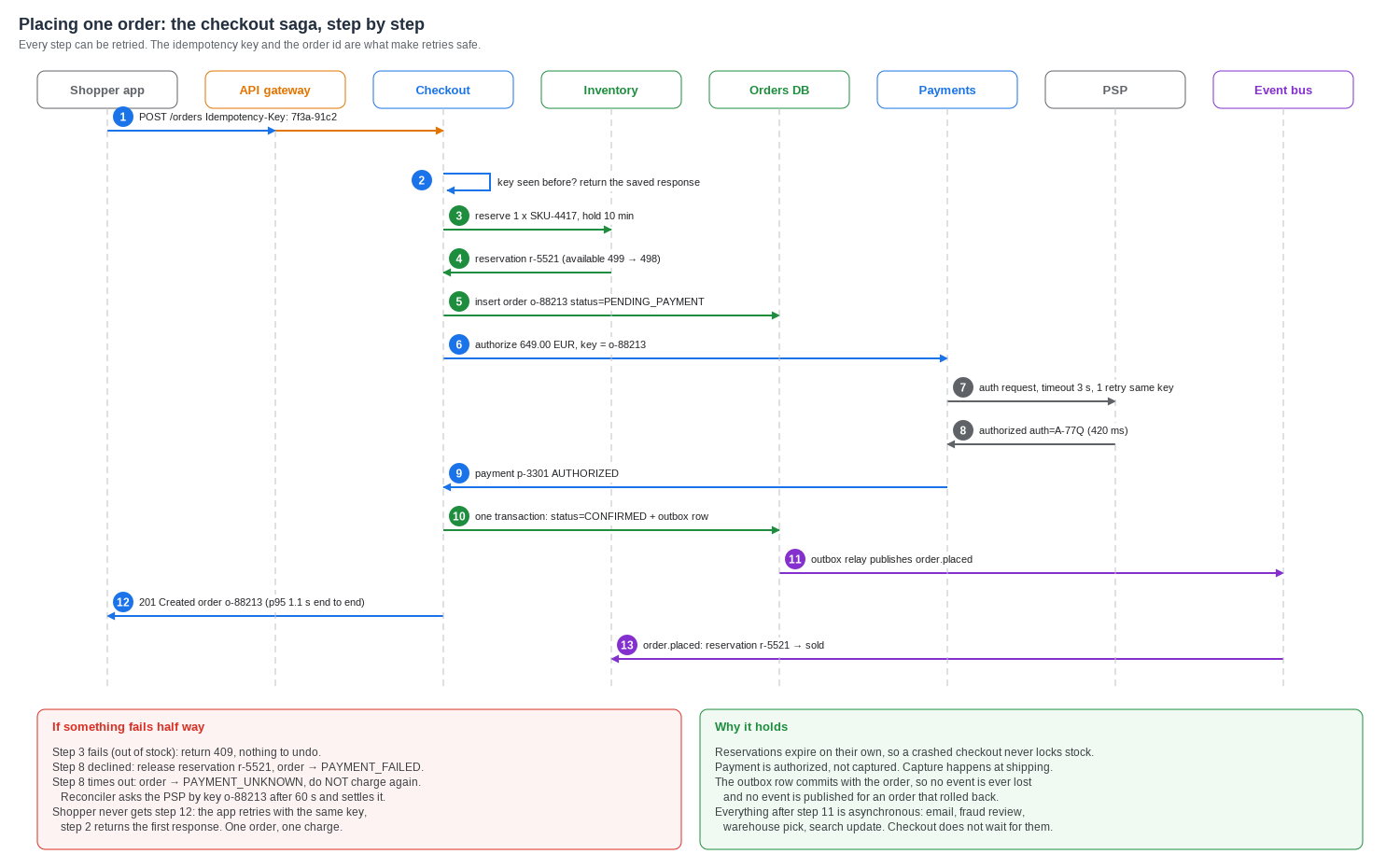
Checkout is a saga: a sequence of local steps in different services, each with a way to undo it, instead of one distributed transaction. The order is:
- The app sends
POST /orderswith anIdempotency-Keyheader it generated when the shopper opened the checkout page. - Checkout looks up the key. If it has seen it, it returns the saved response and stops.
- Inventory reserves the stock with a 10-minute expiry.
- The order is written as
PENDING_PAYMENT. - Payments asks the provider to authorize (not capture) the amount, using the order id as the provider's idempotency key, with a 3-second timeout.
- On success, one database transaction sets the order to
CONFIRMEDand writes an outbox row. - A relay reads the outbox and publishes
order.placed. Inventory turns the reservation into a sale; fulfilment, email and fraud review start on their own. - The shopper gets their order number. In our example, p95 for the whole flow is 1.1 seconds, most of it the payment provider.
The outbox in step 6 deserves a sentence. If checkout writes the order and then publishes an event as two separate actions, a crash between them leaves a confirmed order that the warehouse never hears about. Writing the event into an outbox table in the same transaction, and publishing from there, means the event exists if and only if the order does.
Authorize now, capture at shipping is both a business rule (in many countries you may not take money for goods you haven't shipped) and a design gift: if anything goes wrong after authorization, you void the authorization instead of issuing a refund.
Real-time scenario 1: Black Friday at midnight
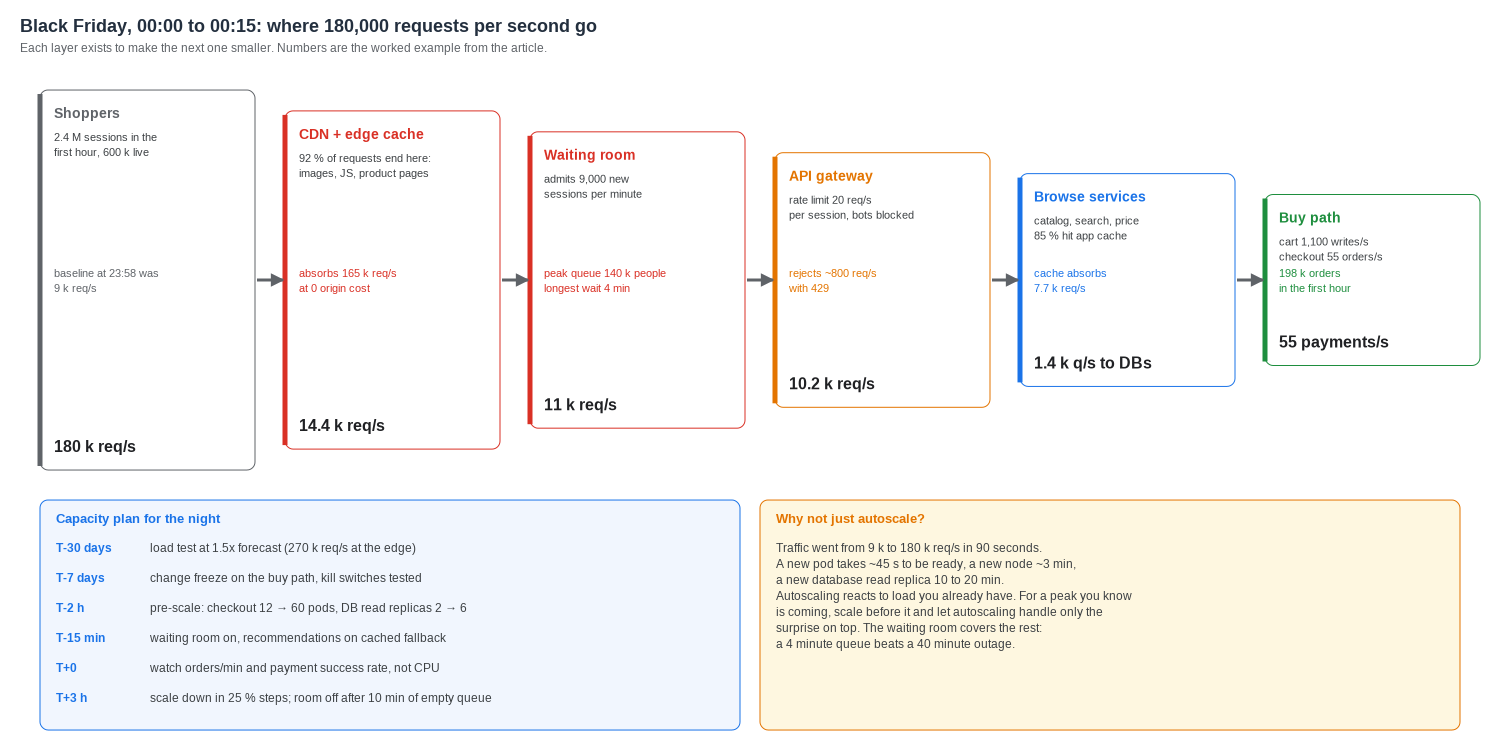
What happens. At 23:58 the site is doing 9,000 requests a second at the edge. The sale opens at 00:00 and an email went to 4 million people at 23:55. By 00:01:30 the edge is at 180,000 requests a second, twenty times the baseline, in ninety seconds.
Why autoscaling won't save you. A new pod takes about 45 seconds to pass its readiness probe (it has to pull an image, warm caches and open database connections). A new node takes about 3 minutes. A new database read replica takes 10 to 20 minutes. Autoscaling reacts to load you already have, so during those minutes the existing pods are at 400% of their target, latency climbs, health checks start timing out and Kubernetes restarts pods that were only busy, which makes it worse. (If you have ever seen that cascade, the difference between readiness and liveness probes is the first thing to check.)
The design that holds. You treat a known peak as a planned event:
- Thirty days out, load test the whole path at 1.5x the forecast: 270,000 requests a second at the edge and 85 orders a second, with the real payment provider's test environment and production-like data. Most of the bugs you find will be connection pool limits and missing indexes, not CPU.
- Seven days out, freeze changes on the buy path and test every kill switch: recommendations off, reviews off, "customers also bought" off, live stock counts replaced with "in stock / low stock".
- Two hours out, pre-scale. Checkout goes from 12 to 60 pods, browse services to their tested peak, database read replicas from 2 to 6, cache cluster to its peak size. You pay for two or three idle hours. That's cheap.
- Fifteen minutes out, turn on the waiting room and switch recommendations to their cached fallback.
- At midnight, watch orders per minute and payment success rate. In our example, 9,000 sessions a minute are admitted from the queue, the longest wait is 4 minutes and the queue peaks at about 140,000 people.
- Three hours later, scale down in steps of 25%, and turn off the waiting room only after the queue has been empty for 10 minutes.
The result in numbers: the CDN absorbs 165,000 of the 180,000 requests a second, the origin sees 10,200, the databases see 1,400 queries a second, and checkout handles 55 orders a second, about 198,000 orders in the first hour. Nothing in that chain is above 60% of what was tested.
The waiting room is the part teams resist, because it feels like admitting defeat. It isn't. A four-minute queue with a clear message converts much better than a site that times out for forty minutes, and it is the only control that limits the number of people inside the system rather than the number of requests.
Real-time scenario 2: the payment provider slows down
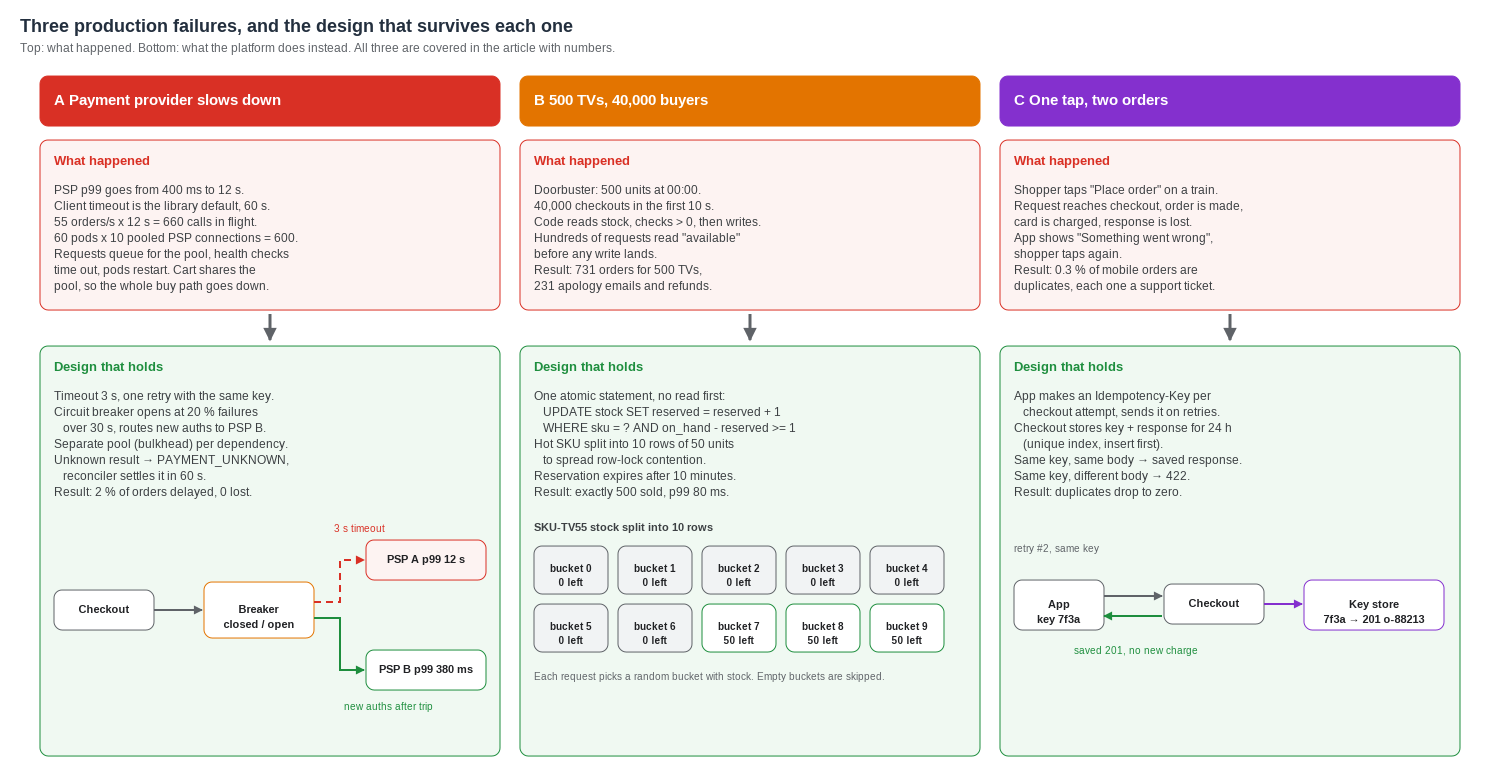
What happens. At 00:20 on Black Friday the primary payment provider starts struggling. Its p99 response time goes from 400 ms to 12 seconds. Nothing is down; it's just slow.
Checkout calls the provider with the HTTP client's default timeout of 60 seconds. At 55 orders a second and 12 seconds per call, there are 660 calls in flight. Checkout runs 60 pods with a pool of 10 connections to the provider each, so 600 connections in total. The pool is full. New requests queue for a connection, checkout latency goes to 30 seconds and then 60, the load balancer's health checks start timing out, pods get restarted with requests still inside them, and because cart and checkout ran in the same deployment and shared its worker threads, adding to cart starts failing too. A slow dependency has taken out the whole buy path.
The design that holds.
- Timeouts based on reality, not defaults. The provider's p99 on a good day is 400 ms; a 3-second timeout is generous. One retry, with the same idempotency key, so a retry can never charge twice.
- A circuit breaker. When more than 20% of calls fail or time out over 30 seconds, the breaker opens and new authorizations go to the second provider. Contract a second provider before you need one; you can't onboard one at midnight.
- Bulkheads. Each dependency gets its own connection pool and its own thread budget. A slow provider can exhaust its own pool, not the cart's.
- An honest "unknown" state. When a call times out you don't know if the provider authorized it. Don't guess and don't retry blindly. Mark the order
PAYMENT_UNKNOWN, tell the shopper "We're confirming your payment, you'll get an email in a minute", and let a reconciler ask the provider by idempotency key 60 seconds later.
The result: about 2% of orders in those twenty minutes took an extra minute to confirm, and none were lost or double-charged. The alert that caught it wasn't CPU or error rate; it was payment success rate dropping from 97% to 81% in two minutes.
Real-time scenario 3: 500 TVs and 40,000 buyers
What happens. The headline doorbuster is a 55-inch TV at 299 euros, 500 units. At 00:00:00, 40,000 people press "Buy now" within ten seconds.
The inventory code does what most first versions do:
-- version 1: looks fine in testing
SELECT on_hand - reserved AS available FROM stock WHERE sku = 'TV55';
-- application: if available >= 1 then ...
UPDATE stock SET reserved = reserved + 1 WHERE sku = 'TV55';
Under load, hundreds of requests read "available: 12" before any of their updates land. Each one decides there's stock and reserves a unit. By the time it's over, 731 orders have been confirmed for 500 TVs, and someone in customer service has to write 231 apology emails, issue refunds and handle the social media fallout.
The design that holds. Never read and then write. Ask the database to do the check and the change as one atomic statement, and look at how many rows it changed:
-- version 2: the check is part of the write
UPDATE stock
   SET reserved = reserved + 1
 WHERE sku = 'TV55' AND bucket = :b
   AND on_hand - reserved >= 1;
-- 1 row updated: you have a unit. 0 rows: try another bucket or say "sold out".
That alone stops the oversell. It creates a new problem, though: 40,000 requests queuing for a lock on one row. The fix is to split the hot SKU into buckets: ten rows of 50 units each. Each request picks a random bucket that still has stock, so ten transactions can proceed in parallel instead of one. When a bucket is empty, requests skip it. With ten buckets, p99 for a reservation stayed at 80 ms in testing at 4,000 reservations a second.
Two more pieces finish the design:
- Reservations expire. A reservation is held for 10 minutes. If the shopper abandons checkout or the app crashes, a job releases it, and the unit goes back on sale. Without expiry, abandoned checkouts quietly lock up your stock.
- The waiting room gets a product-level rule. For a doorbuster, the queue can admit people to that product page at a rate the stock can actually serve, and show "sold out" at the edge once inventory publishes
stock.changedwith zero.
Result: exactly 500 TVs sold, in 41 seconds, and no apology emails.
Real-time scenario 4: one tap, two orders
What happens. A shopper on a train taps "Place order". The request reaches checkout, the order is created and the card is authorized, but the response is lost when the train goes into a tunnel. The app shows "Something went wrong. Please try again." The shopper taps again and gets a second order and a second charge. It happened to 0.3% of mobile orders. With 60% of orders placed on mobile, that's about 70 support tickets on a normal day and over 1,300 on Black Friday.
The design that holds. The app creates an idempotency key (a random UUID) when the shopper reaches the payment step, and sends the same key with every retry of that attempt. Checkout inserts the key into a table with a unique index before doing any work, and stores the response next to it when it finishes. A retry with the same key gets the saved response. A retry with the same key but a different body (the shopper changed the delivery address) gets a 422 so the app knows to start a new attempt. Keys are kept for 24 hours.
Combined with the order id used as the payment provider's key, the same request can be retried by the app, the gateway or checkout itself, and the shopper is charged once. Duplicates went to zero.
Multi-region and disaster recovery
Start with one region and three availability zones. With synchronous replicas across zones you meet the 99.95% target for the buy path and lose nothing when a zone fails. Most retailers at this size never need more.
Go to two regions when either the business needs to survive a full regional outage, or you sell in places far enough apart that latency hurts. When you do, the browse side is easy: catalog, search and caches can run active-active in both regions, fed by the same events. The buy side is hard, because stock and money need one source of truth. The usual answer is:
- Orders and payments: active-passive, with asynchronous replication to the second region and a tested failover that takes under 15 minutes. RPO is a few seconds, so confirmed orders in that window are recovered from the payment provider's records and the outbox.
- Inventory: one writer region per warehouse. A warehouse in Germany has its stock owned by the EU region; that's a natural partition.
- Carts: replicated asynchronously; losing a few seconds of cart changes in a regional disaster is acceptable.
Run the failover as a game day twice a year. A disaster recovery plan that hasn't been run is a document, not a plan.
Observability: measure the business, not just the servers
Every service gets metrics, traces and logs from the platform. The dashboards that matter on a peak night are different:
- Orders per minute against the same minute last week and the forecast. A drop of 30% with no error alarm is how you find a broken payment page.
- Payment success rate per provider and per method. Usually around 97% for cards; a drop of five points is an incident.
- Checkout funnel step conversion: cart to checkout, checkout to payment, payment to confirmed.
- Add-to-cart latency p95 and "Place order" latency p95.
- Waiting room queue length and wait time.
- Stock reservation conflicts per hot SKU.
Trace one order end to end, with the order id as a trace attribute, so support can paste an order number into the tracing tool and see every call it made.
Cost: where the money goes
For a platform of this size, the bill usually lands in this order: CDN egress and image storage, the buy-path databases (because they're provisioned for peak and replicated across zones), compute for browse services, the search cluster, and then everything else. Three things keep it under control:
- CDN hit rate. Every point of hit rate you gain removes origin servers and egress. Cache anonymous product pages; it's the biggest single saving.
- Scheduled scaling. Normal traffic has a daily shape. Scale browse services down overnight on a schedule and keep autoscaling for the unexpected.
- Right store per job. Clickstream in the warehouse, not in the orders database. Images in object storage, not a database blob column. Carts in a key-value store with a TTL, not in a relational table that grows forever.
Common mistakes I see in e-commerce designs
- One shared database for every service. It works until the first peak, when a slow reporting query in the merchandising tool locks rows that checkout needs.
- Sizing on daily averages. 1,700 requests a second on average says nothing about 180,000 at midnight.
- Synchronous calls for side effects. Checkout calling email, loyalty points and analytics in line means checkout is only as available as the least available of them.
- Default timeouts everywhere. Library defaults of 30 or 60 seconds turn a slow dependency into an outage.
- Stock checks that read before writing. Every oversell I've seen started this way.
- No idempotency on "Place order". Mobile networks guarantee retries; design for them.
- Trusting the price in the cart. Recalculate at checkout, always.
- Load testing the happy path only. Test with the payment provider slow, a cache node down and a hot SKU, or you haven't tested Black Friday.
What's next in this series
This article is part 1 of 10. The rest of the series builds on this design:
- Designing a scalable e-commerce platform (this article)
- Microservices or a modular monolith for e-commerce: how to choose and where to draw the boundaries
- Checkout data and consistency: sagas, the outbox, idempotency and inventory in depth
- Caching, search and flash sales: keeping the browse path fast under 20x traffic
- and 6. Building this platform on AWS: the reference architecture, then running it at peak
- and 8. Building this platform on Azure: the reference architecture, then running it at peak
- Building this platform on Google Cloud
- AWS, Azure and Google Cloud for e-commerce: a side-by-side comparison
Download the diagrams
All four diagrams are editable draw.io files. Open them in diagrams.net or the draw.io desktop app and change them to fit your own platform.
- All four diagrams in one file (4 pages)
- Reference architecture
- Checkout flow, step by step
- Black Friday traffic and capacity plan
- Three production failures and their fixes
References
- Pattern: Saga (microservices.io)
- Pattern: Transactional outbox (microservices.io)
- Idempotent requests (Stripe API documentation)
- Timeouts, retries and backoff with jitter (Amazon Builders' Library)
- Circuit Breaker (Martin Fowler)
- Handling overload (Google SRE book)
- Implementing SLOs (Google SRE workbook)
- PCI DSS document library (PCI Security Standards Council)