
Readiness and liveness probes look the same. They fail very differently.
What actually happens when each Kubernetes probe fails, why liveness should almost never check your database, and when you need a startup probe.

In YAML, a readiness probe and a liveness probe are almost the same block. Same httpGet, same periodSeconds, same failureThreshold. Copy one, rename it, done.
That's exactly how a lot of outages start. The two probes trigger completely different reactions when they fail, and mixing them up turns a small database blip into every pod in the service restarting at once.
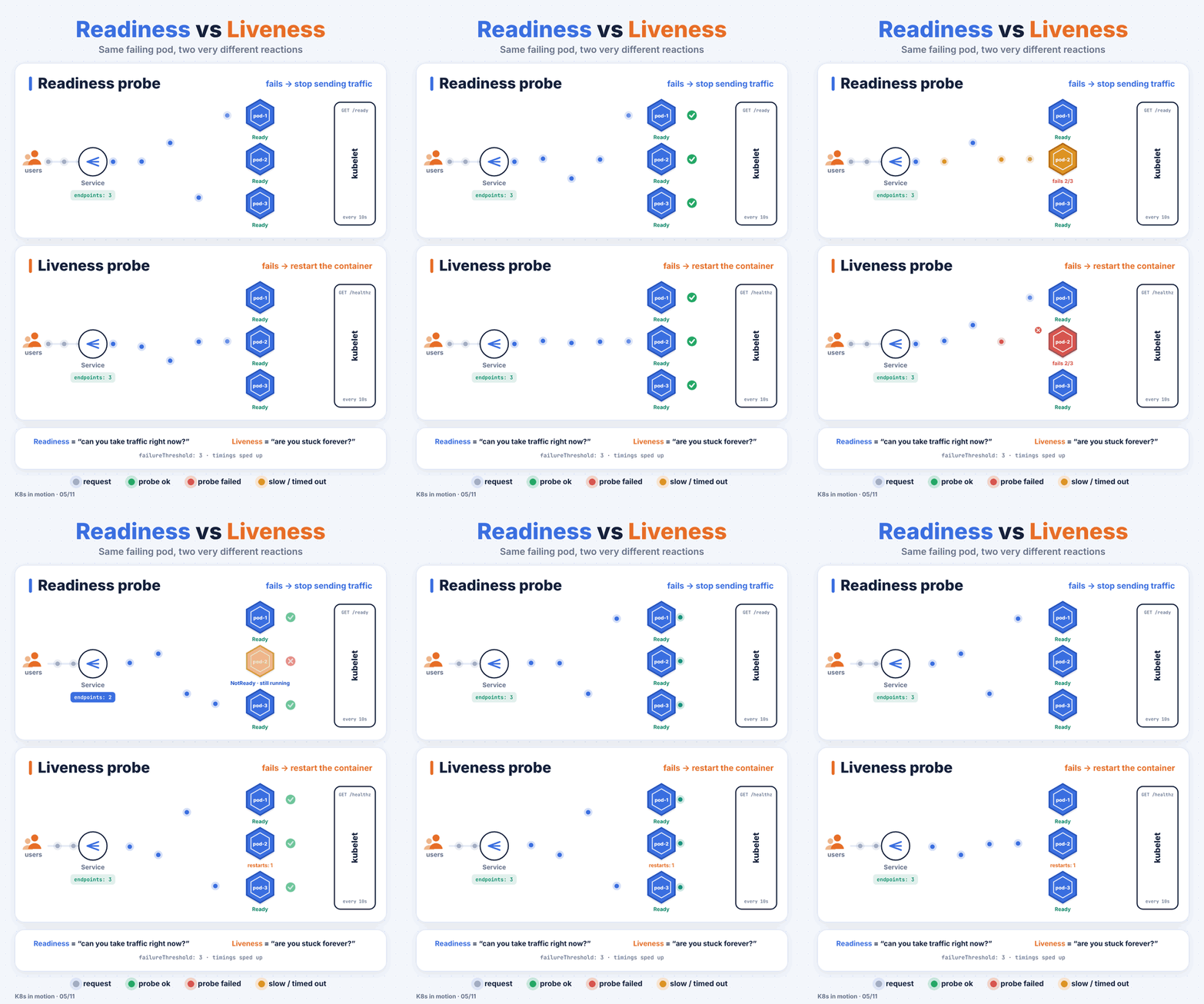
Readiness: "can you take traffic right now?"
Say pod-2 loses its connection to the database and its /ready endpoint starts returning 503.
- The kubelet runs the probe every
periodSeconds(10 by default). - After
failureThresholdfailures in a row (3 by default), the pod is marked NotReady. - It's removed from the Service's EndpointSlices, so traffic goes to
pod-1andpod-3instead. - The container keeps running. Nothing is restarted.
- When the database comes back and the probe passes, the pod goes back into rotation.
Readiness failing is normal and healthy behaviour. It's your app saying "not right now", and Kubernetes politely routing around it.
Liveness: "are you stuck, and only a restart will fix it?"
Now say pod-2 hits a deadlock. It accepts connections but never answers. /healthz times out.
- After 3 failures, the kubelet kills the container and starts it again.
- The
RESTARTScolumn inkubectl get podsgoes up by one. - If it keeps happening, you'll see
CrashLoopBackOffwith growing delays between attempts.
A restart is a heavy tool. It throws away in-memory state, drops in-flight requests and costs you a cold start. You only want it when the process is truly wedged.
The mistake that takes everything down
Here's the pattern to avoid:
livenessProbe:
  httpGet:
    path: /health   # this endpoint pings the database
    port: 8080
The database has a 40-second hiccup. Every pod's liveness probe fails at roughly the same moment. Kubernetes restarts all of them. Now you have a full cold start across the service, a thundering herd of new connections hitting a database that was already struggling, and an incident that's much bigger than the original blip.
The rule: liveness checks only the process itself. Can it respond at all? Dependencies like databases and downstream APIs belong in readiness, or nowhere.
A setup that holds up
startupProbe:
  httpGet: { path: /healthz, port: 8080 }
  periodSeconds: 5
  failureThreshold: 30        # up to 150s to boot
readinessProbe:
  httpGet: { path: /ready, port: 8080 }
  periodSeconds: 5
  failureThreshold: 3
livenessProbe:
  httpGet: { path: /healthz, port: 8080 }
  periodSeconds: 10
  failureThreshold: 3
/healthzreturns 200 if the process is up and its main loop is responsive. No external calls./readycan check dependencies and warm-up state, because failing it is cheap.- The startup probe holds off the other two until the app has booted. Without it, a slow starter (a JVM app, or a model server loading weights) gets killed by liveness before it ever finishes starting.
Things worth knowing
- No readiness probe means "Ready" the moment the container starts. If your app needs 20 seconds to warm caches, users get errors for 20 seconds on every rollout.
- Readiness matters during rollouts. A Deployment won't move on to the next batch until new pods are Ready. A good readiness probe is what makes a rolling update actually safe.
- Watch the events.
kubectl describe pod <name>showsReadiness probe failedorLiveness probe failedalong with the HTTP status or error. That's usually the fastest clue.
kubectl get events --field-selector reason=Unhealthy -A
That one command lists every probe failure in the cluster. It's a good thing to check after any deploy.