
Connecting AWS and Google Cloud for a large enterprise: the network design that holds up
A reference architecture for joining AWS and Google Cloud privately: IP planning, the three interconnect options, hub-and-spoke on both sides, hybrid DNS and security, with editable draw.io diagrams.

Most big companies don't decide to be multi-cloud. It happens to them. An acquisition arrives on Google Cloud, the data team falls in love with BigQuery, the platform team has five years of AWS behind it, and one day someone asks why the GKE service can't call the API running on EKS.
That question is a networking question, and it's worth answering properly once, because every shortcut taken here (a quick VPN, a peering here and there, "we'll fix the IPs later") turns into an outage or a migration project two years on.
This is the design I'd put in front of an architecture board for joining AWS and Google Cloud at enterprise scale. Every diagram is a real .drawio file built with draw.io's official AWS and Google Cloud icon shapes, and you can download them from the end of this article and change them for your own estate.
The short version
- Plan the IP space before you buy a single link. Overlapping ranges are the one mistake you can't route around.
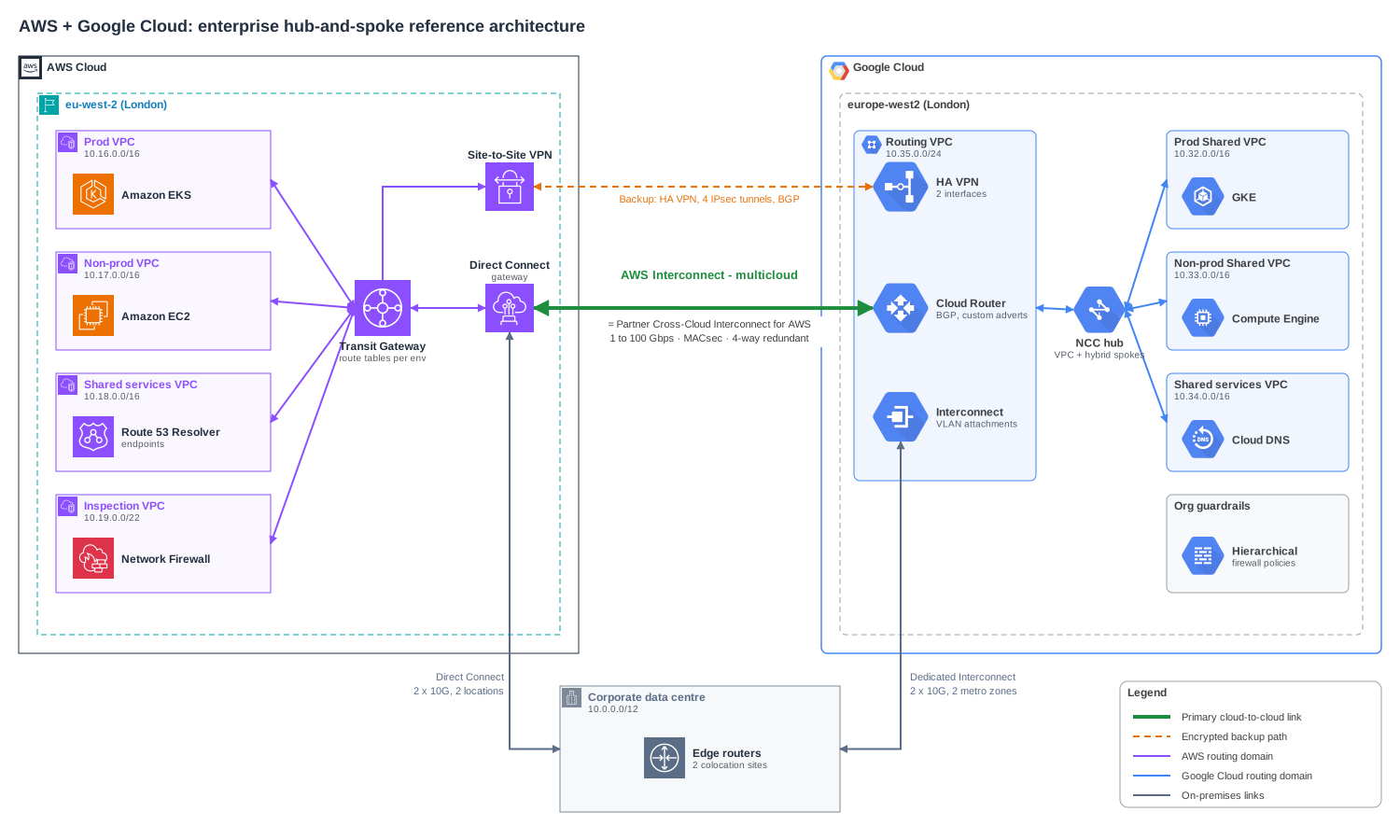
- Build a hub on each side. Transit Gateway (or Cloud WAN) on AWS, Network Connectivity Center (NCC) on Google Cloud. Workload VPCs are spokes and never connect to the other cloud directly.
- Join the hubs, not the workloads. One private, redundant link between the two hubs, plus an encrypted VPN as backup.
- Pick the link by region and volume. AWS Interconnect - multicloud if your regions are a supported pair, a colocation if you already have one, HA VPN to start or as backup.
- Make DNS boring. One name space, conditional forwarding both ways, no hand-maintained IPs in app config.
- Default deny across the boundary. Inspect on the way through, and still use workload identity and mTLS on top.
Step 1: the IP plan
This comes first because it's the only part you can't fix later with a route. If 10.0.0.0/16 exists in both clouds, the hubs can't tell which one you mean, and you're into NAT, which breaks everything that logs or allows by source IP.
Give each cloud its own large, contiguous block, then carve environments out of it. One /8 split into /12s works well for most enterprises:
| Block | Owner | Notes |
|---|---|---|
10.0.0.0/12 |
On-premises and colocation | Usually inherited. Map it first. |
10.16.0.0/12 |
AWS | /16 per VPC: prod 10.16, non-prod 10.17, shared services 10.18, inspection 10.19 |
10.32.0.0/12 |
Google Cloud | /16 per Shared VPC: prod 10.32, non-prod 10.33, shared services 10.34, routing 10.35 |
10.48.0.0/12 |
Next region or acquisition | Reserved. You will need it. |
100.64.0.0/10 |
Pod ranges that never leave the cluster | Reused per cluster, never advertised |
A few rules that save pain:
- Advertise summaries, not subnets. AWS announces
10.16.0.0/12, Google Cloud announces10.32.0.0/12. BGP sessions on both sides have prefix limits, and a summary doesn't change every time someone adds a subnet. - Keep pod ranges out of it. EKS with the VPC CNI and VPC-native GKE both hand pods real VPC addresses, and they eat space fast. Put pods in a secondary range (
100.64.0.0/10with EKS custom networking, a secondary range on GKE), and have cross-cloud callers go through internal load balancers. On NCC, use the spoke's export filter to keep those ranges out of the hub. - One source of truth. AWS has VPC IPAM; Google Cloud doesn't have an equivalent, so whatever you use (IPAM, NetBox, a reviewed YAML file in Git), both clouds allocate from the same place.
Step 2: choose how the clouds meet
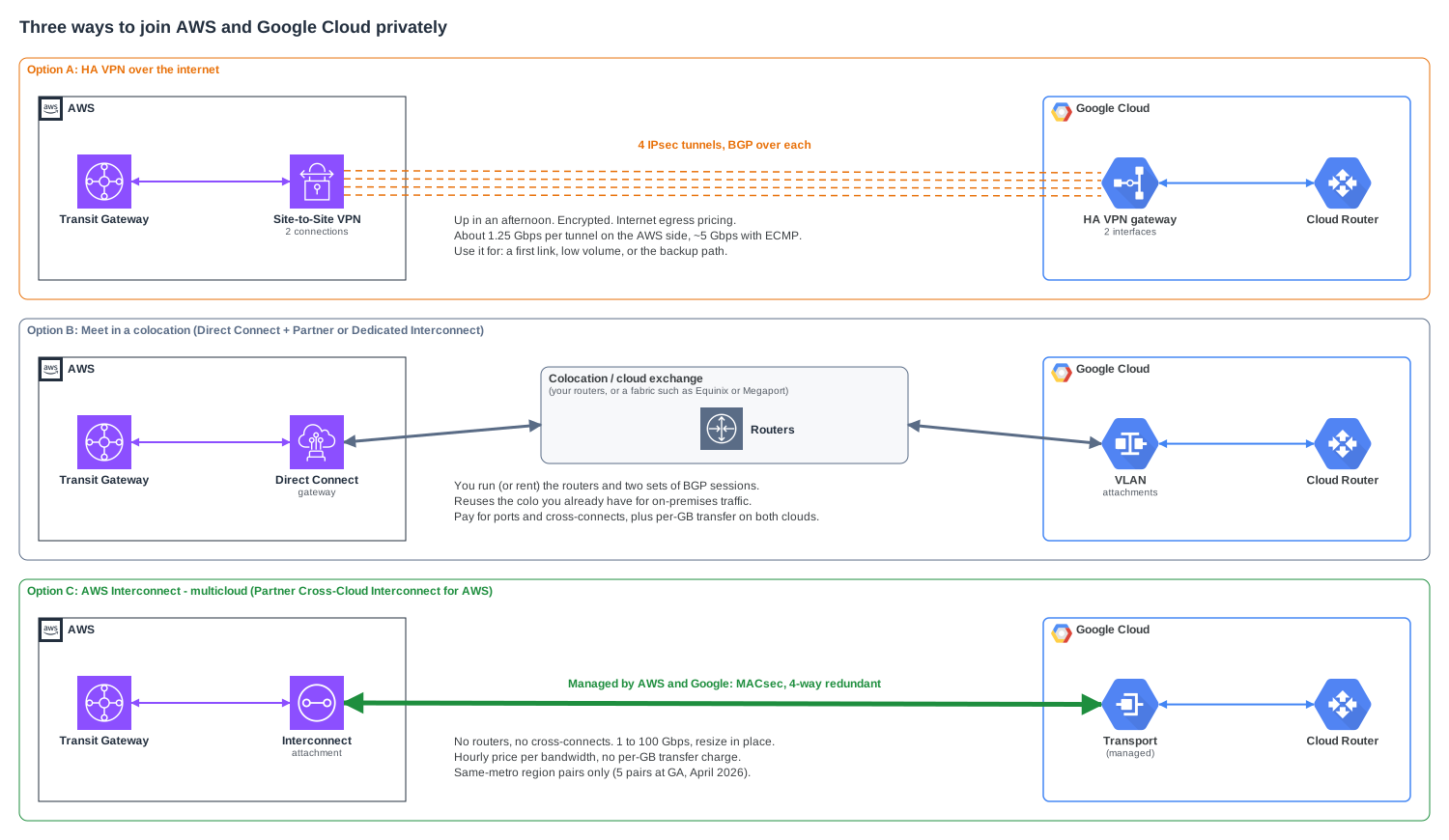
There are three realistic ways to join AWS and Google Cloud privately. They aren't exclusive, and most enterprises end up with two of them.
Option A: HA VPN over the internet
AWS Site-to-Site VPN on the Transit Gateway on one side, Google Cloud HA VPN on the other. Two AWS VPN connections give you four tunnels, landing on the two interfaces of the HA VPN gateway, with a BGP session on each tunnel.
It's encrypted, it's quick to build, and Google publishes a step-by-step guide for exactly this pairing. The limit is throughput: an AWS VPN tunnel tops out at about 1.25 Gbps, so four tunnels with ECMP on the Transit Gateway give you roughly 5 Gbps on a good day. You also pay internet egress rates on both sides.
Use it as your first link while the private one is being ordered, and keep it forever as the backup.
Option B: meet in a colocation
If you already have racks in an Equinix or Digital Realty facility for on-premises connectivity, both clouds can meet you there. AWS Direct Connect lands on your routers, Google Cloud Dedicated or Partner Interconnect lands on the same routers, and BGP stitches them together. Cloud exchanges like Equinix Fabric or Megaport do the same thing with virtual routers, so you don't need hardware.
The upside is that it reuses what you have, and you can push 10 or 100 Gbps. The downside is that you own the middle: router pairs, two sets of BGP sessions, cross-connect orders, and capacity planning. You also pay per-GB data transfer out of both clouds, at the cheaper interconnect rates.
Google also offers Cross-Cloud Interconnect, where Google provisions the physical 10 or 100 Gbps link between its network and your AWS Direct Connect port in a shared location. It removes your routers from the picture but still leaves you with two sets of port charges.
Option C: AWS Interconnect - multicloud
This went generally available in April 2026, and for a lot of enterprises it changes the answer. AWS and Google Cloud run the link between them as one managed product. AWS calls it AWS Interconnect - multicloud, and Google calls its half Partner Cross-Cloud Interconnect for AWS. On the AWS side you get a single attachment you can connect to a Transit Gateway, Cloud WAN or a Direct Connect gateway. On the Google side you get a managed transport that you connect to your VPC and Cloud Router.
What you get, based on the GA announcement:
- Bandwidth from 1 to 100 Gbps, changed in place without rebuilding the connection.
- Four-way redundancy across at least two physical facilities, and MACsec encryption on the links between the providers' routers.
- Hourly pricing by bandwidth on each side, with no per-GB data transfer charge. For chatty workloads that alone can pay for the whole design.
- Same-metro region pairs only. At GA these were N. Virginia, N. California, Oregon, London and Frankfurt, each paired with the Google Cloud region in the same metro. One connection can't join, say,
us-east-1tous-west1.
The catches are what you'd expect from a new service. Check the current region list, check the SLA on both sides (each provider covers its own half), and note that the VPC MTUs have to match. Google VPCs default to 1460 bytes, AWS VPCs to 9001, so set them deliberately.
Which one?
| HA VPN | Colocation (B) | AWS Interconnect - multicloud (C) | |
|---|---|---|---|
| Bandwidth | ~5 Gbps with 4 tunnels | 10–100+ Gbps | 1–100 Gbps |
| Time to first packet | Hours | Weeks (ports, cross-connects) | Minutes to days |
| Who runs the middle | Nobody (internet) | You | AWS and Google |
| Encryption | IPsec | Add MACsec or VPN yourself | MACsec on the provider link |
| Transfer cost | Internet egress, both sides | Interconnect egress, both sides | None per GB, hourly per Gbps |
| Best for | Backup, getting started | Existing colo, unsupported regions | Primary link in supported regions |
My default for a large enterprise: Option C as the primary link wherever your regions pair up, HA VPN as the always-on backup, and Option B only where you already run a colocation or your regions aren't covered yet. On-premises still connects to each cloud on its own Direct Connect and Interconnect circuits, but cloud-to-cloud traffic shouldn't hairpin through your data centre.
Step 3: hub and spoke on both sides
Never connect a workload VPC directly to the other cloud. VPC peering isn't transitive on either side, and a mesh of peerings and VPNs becomes impossible to reason about by the third business unit.
On AWS, the Transit Gateway is the hub. Each VPC attaches to it, and route tables decide who can talk to whom: prod sees prod and shared services, non-prod sees non-prod and shared services, and anything leaving for Google Cloud is sent through the inspection VPC first. Turn on appliance mode on the inspection attachment, or return traffic can take a different Availability Zone and get dropped by the firewall. If you run several AWS regions, AWS Cloud WAN gives you the same thing as a global policy-driven network, and the Interconnect attaches to it too.
On Google Cloud, NCC is the hub. Workload networks, usually one Shared VPC per environment, join as VPC spokes. The cloud links (HA VPN tunnels, Interconnect VLAN attachments) live in a small routing VPC with the Cloud Router, which joins as a hybrid spoke. NCC can now exchange dynamic routes between hybrid and VPC spokes, so prefixes learned from AWS reach the Shared VPCs without static routes. NCC hubs are global, so one hub covers every region.
Then make the routing explicit:
- Make the private link win. On Google Cloud, give the VPN BGP sessions a higher advertised route priority (MED) than the Interconnect, say 1000 against 100. On AWS, check where your attachments sit in the Transit Gateway route evaluation order and use AS-path prepending on the VPN if you need to tip it.
- Use private ASNs and write them down. For example
64512for the Transit Gateway and64514for Cloud Router. Clashing ASNs cause odd route drops that are hard to debug. - Test failover on purpose. Shut the primary BGP session during a quiet window and watch traffic move to the VPN. The first time you do this, something will surprise you, usually MTU. The VPN path carries less payload per packet than the interconnect, and if large transfers hang after failover, it's TCP MSS clamping you're missing.
Step 4: DNS across both clouds
Applications should call orders.aws.corp.example and ledger.gcp.corp.example, not IP addresses. That means three resolvers (Route 53 Resolver, Cloud DNS and your on-premises DNS) all agreeing on one name space.
How it fits together:
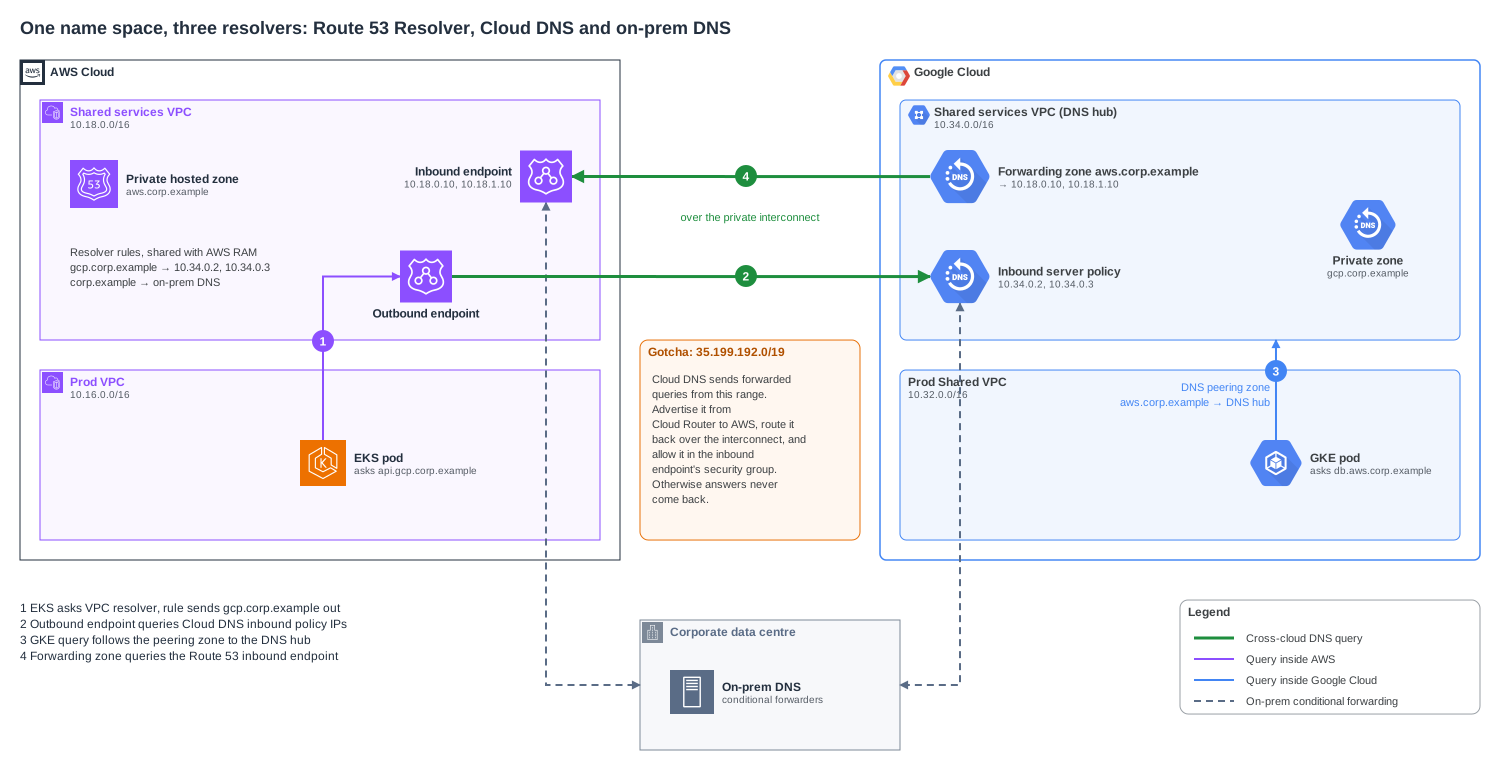
- Each cloud owns a subdomain.
aws.corp.exampleis a Route 53 private hosted zone,gcp.corp.exampleis a Cloud DNS private zone. Nobody else hosts copies. - AWS to Google Cloud. A Route 53 Resolver rule sends
gcp.corp.exampleto the Cloud DNS inbound server policy addresses through an outbound endpoint. Share the rule with every account using AWS RAM, so spokes don't each build their own. - Google Cloud to AWS. A Cloud DNS forwarding zone for
aws.corp.exampletargets the Route 53 Resolver inbound endpoint. Put it in the shared services VPC and let workload VPCs reach it through DNS peering zones. - On-premises gets conditional forwarders for both subdomains, and both clouds forward
corp.exampleback to it.
The one that catches everyone: Cloud DNS sends forwarded queries from 35.199.192.0/19, not from an address in your VPC. Cloud Router doesn't advertise that range unless you add it as a custom advertisement, and the Route 53 inbound endpoint's security group has to allow it. Miss either one and queries leave Google Cloud but the answers never come back. See Cloud DNS forwarding zones for the details.
Also: don't forward the same zone in both directions. A loop between two resolvers doesn't fail fast. It times out slowly and fills logs.
Step 5: security across the boundary
A private link is not a trust boundary. Treat everything arriving from the other cloud as you'd treat traffic from a partner network: deny by default, allow specific flows, log everything.
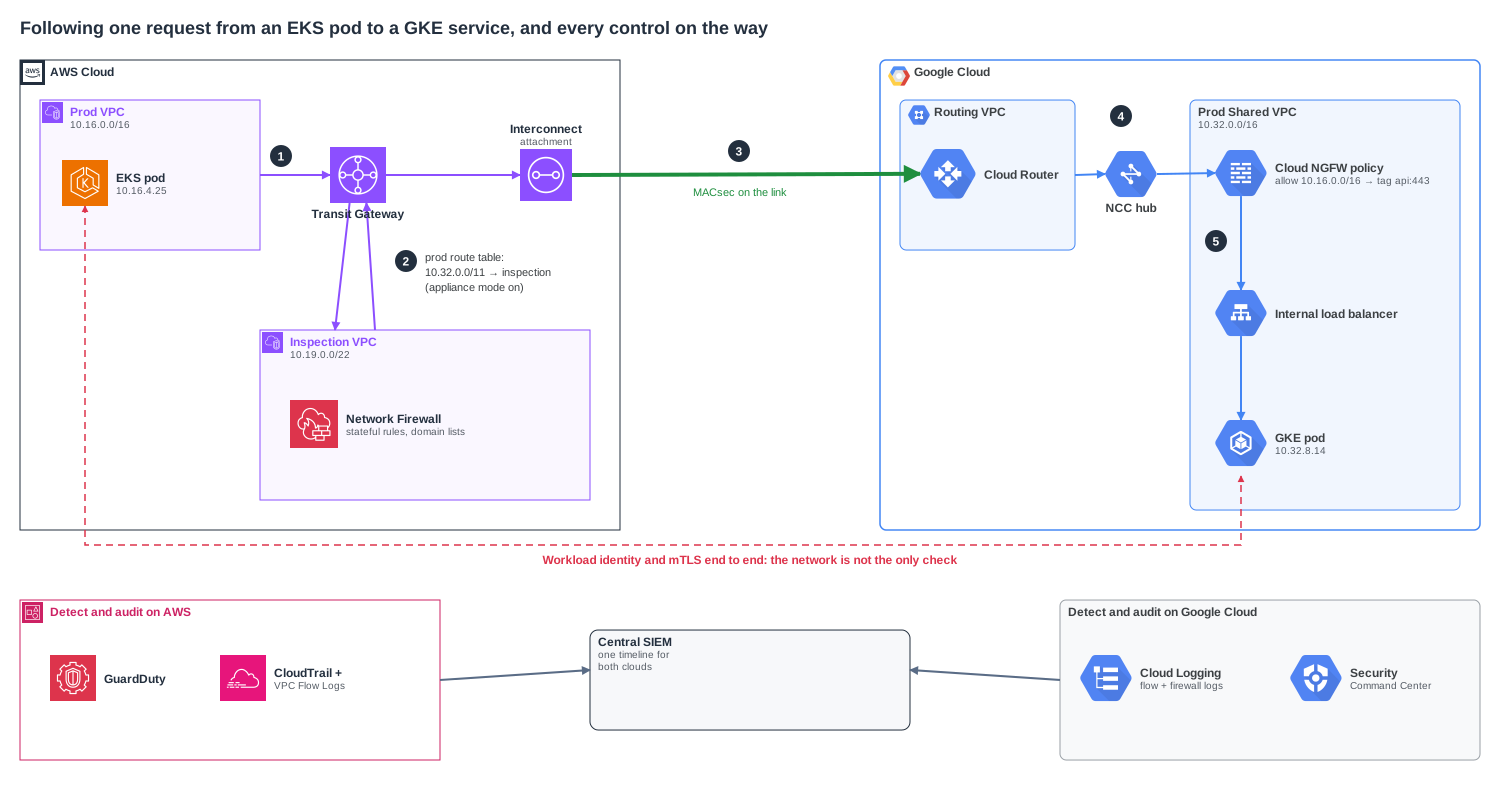
- Inspect on the AWS side, filter on the Google side. Cross-cloud routes in the Transit Gateway point at the inspection VPC, where AWS Network Firewall applies stateful rules and domain lists. On Google Cloud, Cloud NGFW firewall policies, with secure tags instead of IP lists where you can, decide which services accept traffic from the AWS range. Hierarchical policies at the organization level hold the rules no project owner can override.
- Encrypt even on private links. AWS Interconnect - multicloud encrypts the provider link with MACsec. On colocation links, enable MACsec on Direct Connect and Dedicated Interconnect, or run HA VPN over the Interconnect. Either way, services should still speak TLS to each other.
- Identity beats IP. Firewalls know addresses. Use mTLS between services, and use workload identity federation when a workload in one cloud needs to call the other cloud's APIs, instead of copying long-lived keys around.
- Stop shadow connectivity. If any team can create its own VPN or peering, the hub stops being the only door. Use an AWS service control policy to deny
ec2:CreateVpnConnectionandec2:CreateVpcPeeringConnectionoutside the network account, and Google Cloud organization policies such ascompute.restrictVpnPeerIPsandcompute.restrictVpcPeering. Explicit deny is your friend here. I've written about how it works across clouds. - One timeline for both clouds. VPC Flow Logs, Network Firewall logs and Cloud NGFW logs belong in the same SIEM, with the same field names. When something crosses the boundary at 3 a.m., you don't want to correlate two consoles by hand.
The reference architecture, in one list
If you only take one thing to the design review, take this:
- A network account on AWS and a network host project on Google Cloud, owned by one platform team, holding the hubs, the links and the DNS.
- Non-overlapping, summarised address space, allocated from one source of truth, with pod ranges kept local.
- Transit Gateway or Cloud WAN and an NCC hub, with every workload network as a spoke and separate route tables per environment.
- AWS Interconnect - multicloud between paired regions as the primary link, sized for real traffic, and HA VPN as an always-on backup with lower BGP preference.
- Direct Connect and Interconnect from on-premises to each cloud, in two locations each, so a single facility can't cut you off.
- Split-horizon DNS by subdomain, with Route 53 Resolver endpoints and Cloud DNS forwarding, and
35.199.192.0/19advertised and allowed. - Inspection and deny-by-default between clouds, mTLS and federated identity between services, and organization-level guardrails against side doors.
- A failover test every quarter, with someone watching MTU, BGP and DNS while it happens.
Where people get bitten
- Data transfer cost. On the older options, every gigabyte crossing the boundary is billed on the way out. Put chatty services in the same cloud, and if you can't, that's a strong reason to use Option C.
- Asymmetric routing. Traffic out over the interconnect, replies back over the VPN, and a stateful firewall in the middle drops them. Match BGP preferences in both directions.
- Prefix limits. Advertise fifty
/24s instead of one summary and you'll hit a BGP prefix quota on the busiest day of the year. - Region pairing. Your AWS workloads in Frankfurt and your Google ones in Belgium won't share a managed interconnect. Decide region pairs before teams pick regions.
- The VPN backup that nobody tested. It's been "up" for a year, but its routes were never accepted because someone filtered them. Fail over on purpose.
Download the diagrams
All four diagrams are editable draw.io files. They use the AWS and Google Cloud shapes that ship with draw.io, so you can open them in diagrams.net or the draw.io desktop app and change the CIDRs, regions and names to match your estate.
- All four diagrams in one file (4 pages)
- Reference architecture
- Interconnect options
- Hybrid DNS
- Inspected cross-cloud path
The CIDRs, ASNs and IP addresses in them are examples. Check your provider limits, quotas and prices for your own regions before you order anything.
References
- AWS Interconnect - multicloud
- InfoQ: AWS Interconnect reaches general availability
- Google Cloud: Cross-Cloud Interconnect overview
- Google Cloud: HA VPN between Google Cloud and AWS
- Google Cloud: Network Connectivity Center overview
- AWS: How transit gateways work
- AWS: Appliance mode for stateful inspection
- AWS: Site-to-Site VPN quotas
- Amazon Route 53 Resolver
- Cloud DNS forwarding zones