
Claude Code works best when you give it a way to check its own work
A practical workflow for Claude Code: a short CLAUDE.md, planning before editing, a clean context per task, hooks for the rules that must hold, and checks it can run itself.

The first week with Claude Code usually goes the same way. You ask for a feature, it edits eight files, and you spend twenty minutes working out which of those changes you actually wanted. Then the session gets long, answers get vaguer, and you start wondering whether the tool got worse.
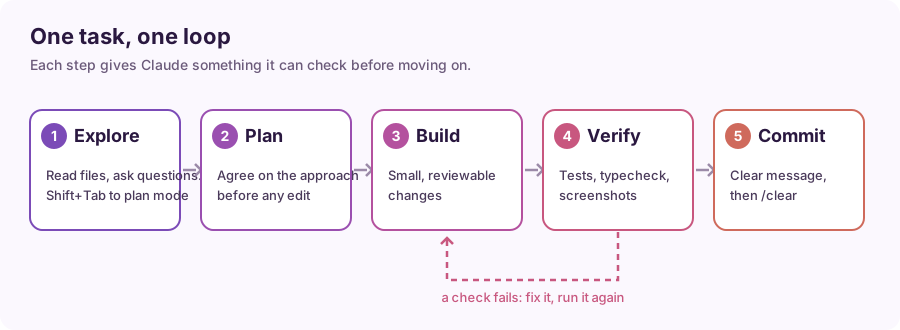
It didn't. Most of the difference between a frustrating session and a great one comes down to a few habits: keep the context clean, agree on a plan before code changes, and give Claude a way to prove it's done. Here's the setup I'd recommend, with examples you can copy.
1. Keep CLAUDE.md short and specific
CLAUDE.md is loaded into every session in that project. It's where you put what a new teammate would need on day one: how to build, how to test, and the conventions that aren't obvious from the code.
Run /init to get a starting draft, then cut it down. The docs suggest keeping each file under 200 lines. Longer files use more context and Claude follows them less reliably.
# Build and test
- Install: pnpm install
- Test one file: pnpm vitest run path/to/file.test.ts
- Typecheck: pnpm tsc --noEmit

# Conventions
- API handlers live in src/api/<resource>/handler.ts
- Never edit generated files in src/gen/
- Use the logger in src/lib/log.ts, not console.log
A few things worth knowing:
- Where it lives.
./CLAUDE.mdor./.claude/CLAUDE.mdis shared with your team through git.~/.claude/CLAUDE.mdis just for you, across every project../CLAUDE.local.mdis for personal notes in one repo (add it to.gitignore). - Import, don't paste.
@docs/api-conventions.mdon its own line pulls that file in, so long references stay in one place. - Rules for one part of the repo go in
.claude/rules/*.mdwith apaths:header, so they only load when Claude works on matching files. - Check what loaded with
/context. If your CLAUDE.md isn't listed, Claude isn't reading it.
CLAUDE.md is advice, not enforcement. For rules that must always hold, use hooks or permission rules (section 5).
2. Plan before it edits anything
For anything bigger than a one-line fix, start in plan mode. Press Shift+Tab to cycle permission modes until you reach plan. In plan mode Claude reads and thinks, but doesn't change files.
A prompt that works well:
Read src/api/orders/ and the tests next to it. I want to add pagination
to GET /orders. Propose a plan: which files change, what the new query
params are, and how we'll test it. Don't write code yet.
Read the plan, push back on anything you don't like, and only then switch to editing. It's much cheaper to fix a plan than a diff.
3. One task per conversation
Every message resends the whole conversation, so a long session full of unrelated work costs more and gets less focused.
/clearbetween unrelated tasks. Treat it like closing a browser tab.- Correct once, then reset. If you've corrected the same mistake twice,
/clearand write a better first prompt that includes what you learned. A fresh start beats a third correction. /compactwhen you need to continue but the context is heavy. Tell it what to keep:/compact keep the API changes and the test commands.Escstops Claude mid-action without losing the work so far./rewind(orEsctwice on an empty prompt) rolls back code, conversation or both.
4. Give it a check it can run
This is the habit that makes the biggest difference. "Add pagination" is a wish. "Add pagination, then run pnpm vitest run src/api/orders and fix anything that fails" is a task with a finish line.
Good checks are things with a clear pass or fail:
- a test command for the files you touched
- a typecheck or linter
- a screenshot of the page compared with a design
- a curl against the local server with the expected response
Ask for evidence, not a summary. "Show me the test output" is better than "all tests pass". And when you want a second opinion, /code-review reviews the current diff in a fresh subagent that didn't write the code.
5. Use hooks for rules that must always hold
Hooks run your own commands at fixed points, every time, whatever the model decides. They live in .claude/settings.json (shared) or ~/.claude/settings.json (personal).
Format every file Claude edits:
{
  "hooks": {
    "PostToolUse": [{
      "matcher": "Edit|Write",
      "hooks": [{
        "type": "command",
        "command": "npx prettier --write --ignore-unknown \"$(jq -r '.tool_input.file_path')\""
      }]
    }]
  }
}
Don't let it stop while the typecheck is red:
{
  "hooks": {
    "Stop": [{
      "hooks": [{ "type": "command", "command": "pnpm tsc --noEmit 1>&2 || exit 2" }]
    }]
  }
}
Exit code 2 blocks the stop and sends the error back to Claude, so it keeps fixing. Pair hooks with permission rules for the hard limits. A deny rule such as Read(./.env) holds in every permission mode.
6. Hand side quests to subagents
A subagent works in its own context and returns only a summary, so a big search doesn't fill your main conversation. Claude Code ships with an Explore subagent for read-only searching, and you can add your own as Markdown files in .claude/agents/:
---
name: reviewer
description: Reviews a diff for bugs and missing tests. Use after a change is made.
tools: Read, Grep, Glob
model: haiku
---
You review code changes. List real bugs and missing tests first,
with file and line. Skip style comments.
Read-only tools keep it safe. A smaller model keeps simple jobs cheap. Use /agents to create one interactively.
7. Match the model and effort to the job
On most plans the default is Opus 5.5 at medium effort, which is the right call for everyday work. Use /model to switch and /effort to change how hard it thinks:
/effort lowfor renames, small fixes and quick questions/effort highorxhighfor a tricky bug or a design decision- add
ultrathinkto a single prompt for one deep pass without changing the setting
8. Script the boring parts
claude -p runs one prompt without the interactive UI, which makes it easy to use in scripts and CI:
cat error.log | claude -p "What's the most likely cause? Answer in 3 bullets."
Add --max-turns or --max-budget-usd to cap a run, and --output-format json when another tool will read the result.
A starter checklist
- [ ]
/init, then trim CLAUDE.md to the commands and conventions that matter - [ ] Plan mode for anything bigger than a one-liner
- [ ]
/clearbetween tasks - [ ] A test or typecheck in every request
- [ ] One formatting hook and one
denyrule for secrets - [ ] A read-only reviewer subagent
None of this is complicated. It's the same discipline you'd use with a new teammate: clear instructions, agreement on the plan, and a definition of done that doesn't depend on anyone's word.