
From the internet to an EKS pod: every checkpoint on the way
Follow one HTTPS request through an Internet Gateway, NACLs, security groups, an ALB, Istio and a NetworkPolicy, and see where each kind of bad traffic gets stopped.

"The pod is running but I can't reach it" is one of those problems where everything looks fine on its own. The pod is healthy, the Service exists, the load balancer is green. Somewhere between the internet and the container, one of half a dozen layers is quietly dropping the packet.
It helps to walk the whole path once, slowly. Here is a single HTTPS request reaching an app on Amazon EKS, and every place that can say no.
The building blocks first
- VPC: your private network in one region, here
10.0.0.0/16, spread across Availability Zones. - Subnet: a slice of the VPC that lives in exactly one AZ.
- Route table: decides where packets go next. This is the only thing that makes a subnet public or private.
- Public subnet: its route table sends
0.0.0.0/0to an Internet Gateway. - Private subnet: its default route points at a NAT Gateway. It can call out, but nothing can call in.
- NACL: a firewall on the subnet. Stateless, numbered rules, and it can both allow and deny.
- Security group: a firewall on the network interface. Stateful, allow-only, and it can reference other security groups ("only from
sg-alb").
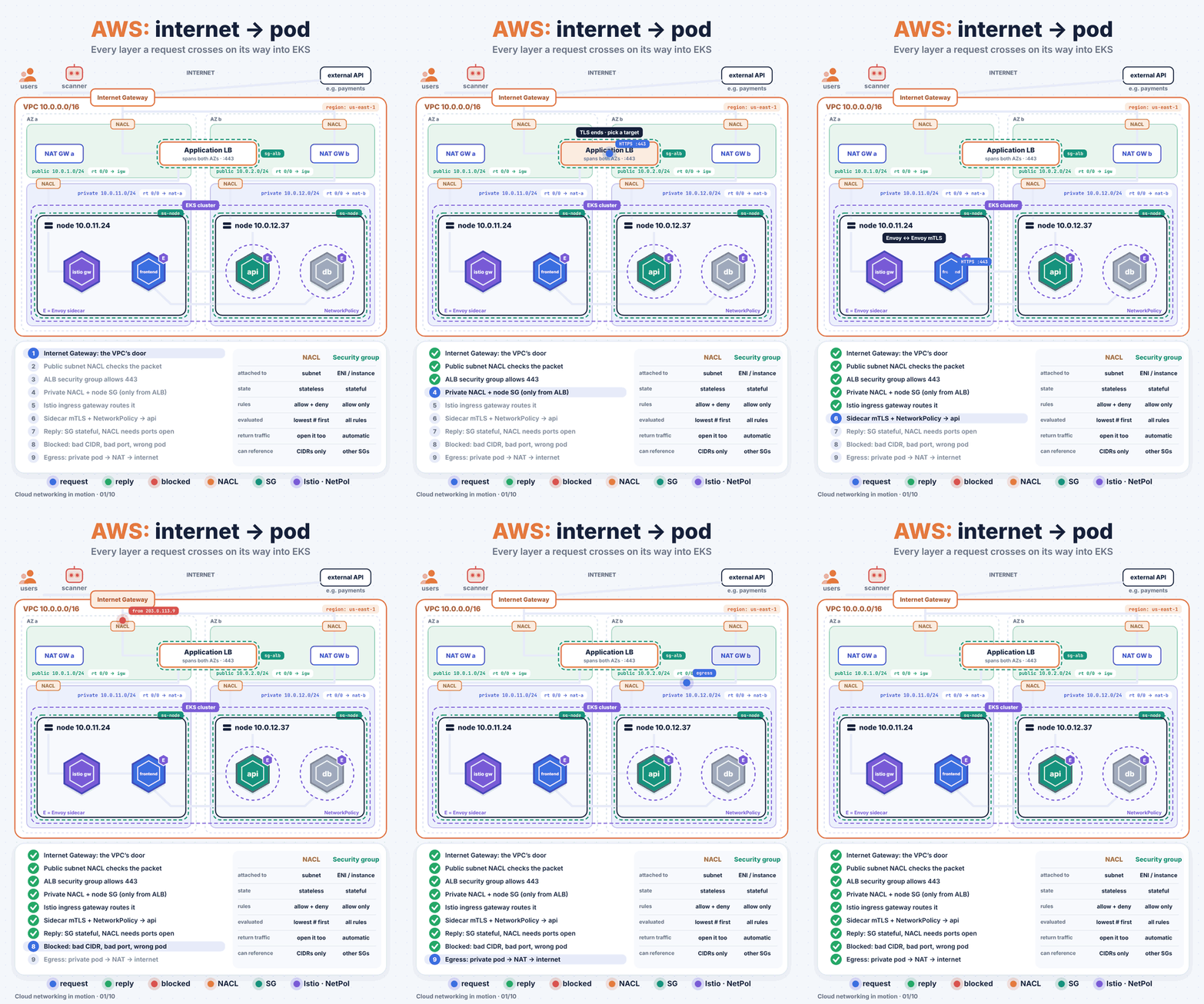
The path of one request
- Internet Gateway. The request enters the VPC.
- Public subnet NACL. Rule 100 allows 443 in.
- ALB security group. Allows 443 from anywhere. TLS terminates at the ALB.
- Into the private subnet. The ALB forwards to a node. The private subnet's NACL checks it, then the node's security group, which only accepts traffic from
sg-alb. - Istio ingress gateway. It matches the host and path from the
GatewayandVirtualServiceand sends the request to thefrontendpods. - Pod to pod.
frontendcallsapi. That hop goes Envoy sidecar to Envoy sidecar over mutual TLS, and a KubernetesNetworkPolicyonapionly accepts traffic fromapp=frontend. - The reply goes back the same way.
What gets blocked, and where
- A scanner from
203.0.113.0/24hits NACL rule 90, which denies that range. A security group couldn't do this. Security groups have no deny rules. - SSH on port 22 reaches the ALB, but
sg-albhas no rule for it, so it's dropped. frontendtrying to reachdbdirectly is stopped at the pod by NetworkPolicy, even though both are inside the same VPC and the same cluster.
On the way out, a pod in a private subnet that calls an external API goes through the NAT Gateway, which swaps its private IP for the gateway's Elastic IP.
Where people get bitten
- NACLs are stateless. Allow 443 inbound but forget outbound ephemeral ports (1024 to 65535), and the replies die silently. Security groups track connections. NACLs don't.
- Pods eat VPC addresses. With the Amazon VPC CNI, every pod gets a real IP from your subnet. A
/24private subnet runs out much faster than you'd think. Size them generously, or look at prefix delegation. - One NAT Gateway per AZ. A single shared NAT is a cross-AZ data charge on every call and a single point of failure.
- NetworkPolicy needs an enforcer. The VPC CNI's network policy agent, Calico or Cilium. Without one, your policies are accepted and silently ignored.
- mTLS and NetworkPolicy aren't either/or. Istio checks who is calling at L7. NetworkPolicy checks IPs and ports at L3/L4. Use both.
A quick check when traffic doesn't arrive
Work from the outside in:
# Is the ALB target healthy?
aws elbv2 describe-target-health --target-group-arn <tg-arn>

# What does the node's security group actually allow?
aws ec2 describe-security-groups --group-ids <sg-node> \
  --query 'SecurityGroups[0].IpPermissions'

# Does the Service have endpoints?
kubectl get endpointslices -l kubernetes.io/service-name=frontend

# Which NetworkPolicies select the target pod?
kubectl get networkpolicy -n <namespace>
If the target group is unhealthy, look at security groups and NACLs. If it's healthy but requests fail, look at Istio routing and NetworkPolicy.